Orange Marketing
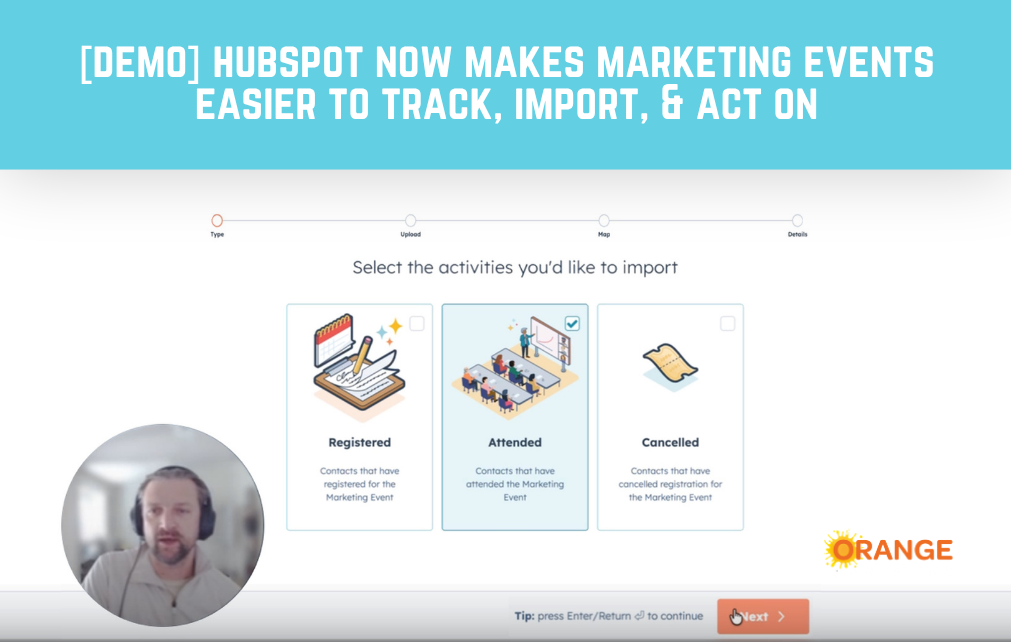
For a long time, HubSpot’s Marketing Events tool felt useful, but very limited. You could track webinar and event activity, especially through connected tools like Zoom, GoToWebinar, Microsoft Teams, or Eventbrite, but native event management inside HubSpot was not flexible. That is starting to change.
Our RevOps Director, Kirill Ougarov, put together a video walkthrough we include in this post to show what improved. He covers how HubSpot’s updated Marketing Event object works, why the new import functionality matters, and where marketers still need to watch for limitations.
The short version: Marketing Events now behave much more like a real HubSpot object. That means cleaner event records, more useful participant tracking, better import options, and new ways to manage registrations for webinars, conferences, offline events, and other marketing programs.
It is not perfect. Kirill covers the limitations too. But if your team has been using spreadsheets, custom objects, or workaround workflows to manage event participation, this update is worth a look:
What Changed With HubSpot Marketing Events?
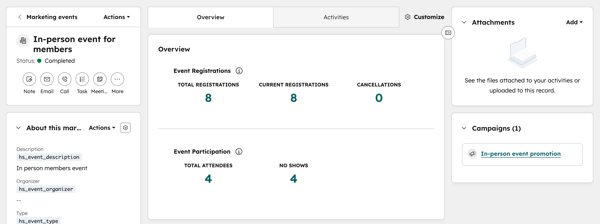 HubSpot has converted the Marketing Event object into a more complete CRM object. Marketing Events now use HubSpot’s familiar three-column record layout, so the event record feels more like the records marketers and RevOps teams already use for contacts, companies, deals, and tickets.
You can customize the record view, review event details, see status information, and track event performance in one place. You can also see participation totals, including registrations, cancellations, attendees, and no-shows.
That matters because events are not just calendar items. They are campaign touchpoints. They show who raised their hand, who showed up, who canceled, and who may need follow-up.
The Import Functionality Is the Big Win
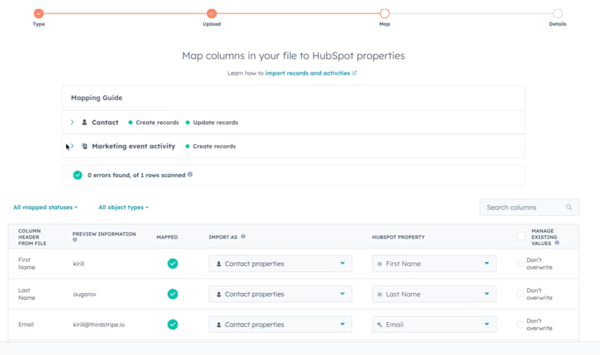 Kirill’s favorite part of the update is the new import functionality, and we agree. This is where the Marketing Event object becomes much more practical.
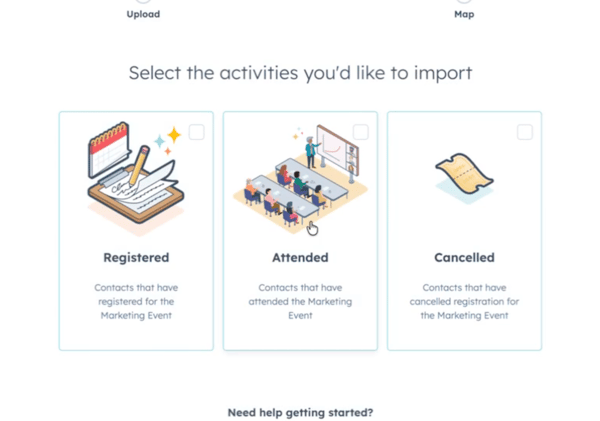
Inside an individual marketing event, you can now import event participants and associate them with that event. That is especially helpful after offline events, where teams often come back with spreadsheets of booth visitors, attendees, registrants, or cancellations.
You can import contacts as:
• Registered
• Attended
• Canceled
HubSpot also supports event activity date fields during import, so you can include context around when someone registered, attended, or canceled.
For marketers, this matters because follow-up depends heavily on participation status. A registrant who never attended should not always receive the same follow-up as someone who joined the full session. An attendee from a high-fit account may need faster sales outreach. A canceled registration may belong in a nurture sequence.
Cleaner event data gives you better options.
Workflows Help, But They Do Not Cover Everything
The update also includes workflow support. You can use workflows to register contacts for a marketing event, which is helpful if you want to use a HubSpot form as the front end for registration.
For example, someone fills out a webinar form. A workflow adds that person as a registered participant for the related Marketing Event. Now your event record reflects that registration, and your team can use that data for segmentation, follow-up, and reporting.
But the automation does not cover every status.
As Kirill notes in the video, workflow options are still limited. Registration can be handled through automation, but other participation statuses, such as attended or canceled, may need to come through an import or an integration.
That is the main RevOps takeaway: this update improves the foundation, but it does not replace the need for a thoughtful event process.
[UPDATE NOTE: As of May 18 (after the demo video was shot), you can now set statuses with workflows.]
Offline Events May Benefit the Most
 Webinar platforms already push a lot of event data into HubSpot. Offline events are where this update may be especially helpful.
Think about trade shows, networking events, executive dinners, workshops, partner events, and customer meetups. These are often high-value marketing activities, but the data gets messy fast.
Someone scans a badge. Someone fills out a paper form. Someone joins a dinner but never gets added to the CRM correctly. Someone from sales has a great conversation, but the event connection is not visible later when pipeline is reviewed.
The improved Marketing Event object gives teams a more structured way to connect those people back to the event record instead of relying on disconnected spreadsheets or one-off lists.
The Catch: It Is Still Not a Full Event Management System
This is where we would avoid overhyping the update.
HubSpot’s Marketing Event object is more useful now, but it still has constraints. Kirill notes that associations are limited, and Marketing Events do not behave exactly like standard objects such as contacts, companies, deals, or tickets.
There are also limits around editing participation statuses. For example, once someone is marked as attended, that status may not be easy to reverse manually. Some statuses are better handled through import or integrated event platforms.
So, no, this does not mean every company should delete its event custom objects tomorrow.
But it does mean many teams should revisit why they created those custom objects in the first place. If the custom object existed only because Marketing Events were not useful enough before, this new functionality may reduce the need for that extra complexity.
What B2B Marketers Should Do Next
If your team uses HubSpot to manage webinars, trade shows, partner events, or customer programs, this is a good time to audit your event process.
Start with a few practical questions:
• Are we tracking registrants, attendees, cancellations, and no-shows consistently?
• Are event participants connected to follow-up workflows, lists, campaigns, and reporting?
• Are we still using a custom object or spreadsheet process that HubSpot’s updated Marketing Event object could now replace?
The answer may not be the same for every event type. A large trade show may still need a more advanced process. A simple webinar or field event may now be much easier to manage natively.
That is the real value of this update. It gives teams another usable option inside HubSpot and a cleaner way to connect event activity with follow-up.
Cleaner Event Data Means Better Follow-Up
Events are expensive. Even a small webinar takes planning, promotion, content, reminders, follow-up, and reporting. In-person events add travel, sponsorships, booth costs, sales time, and post-event coordination.
So the data matters.
If you cannot clearly tell who registered, who attended, who canceled, and who should be followed up with, you lose value after the event ends.
HubSpot’s updated Marketing Event object will not solve every event reporting problem by itself. But it does make event participation easier to structure inside the CRM, especially for teams that want a better bridge between marketing activity and follow-up execution.
Is Your HubSpot Portal Keeping Up?
HubSpot changes fast. The updated Marketing Event object is a good example of a feature that may replace old workarounds, custom objects, or manual event tracking processes.
As a HubSpot Diamond Partner, Orange Marketing follows HubSpot’s weekly updates closely so we can help B2B teams understand which changes matter and how to apply them.
If your portal has grown around outdated processes, disconnected tools, or “temporary” fixes, our HubSpot Portal Audit can help you find what is slowing your team down and where HubSpot can work harder for you.