Orange Marketing
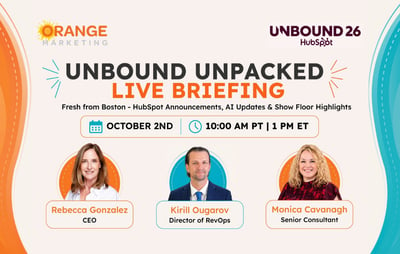
On October 2nd, our CEO Rebecca Gonzalez, Director of RevOps Kirill Ougarov, and Senior Marketing Consultant Monica Cavanagh went live for UNBOUND Unpacked 2026, still wearing their purple UNBOUND shirts. They split the session three ways: Rebecca covered the vibes, Monica covered the content sessions, and Kirill brought the beef with a live demo of HubSpot's newest tools.
First, the name. HubSpot renamed INBOUND to UNBOUND on April 7th, months after we'd already registered. Rebecca, on her seventh conference, admits she was in mourning. When we polled the audience, nobody was mad about it, and most of us landed in the same place: "I get it, but RIP Inbound."
Why UNBOUND Was Different

The first thing we noticed was that purple. Purple everywhere, with pink and orange accents, and almost no HubSpot logos in sight. Every HubSpotter wore the same purple "Be Unstoppable" shirt all week, which doesn't say HubSpot anywhere on it.
The overall experience was a step up, too. Our favorite stop was HubSpot Media, a back room full of old camcorders, boom boxes, and boxed software, an homage to old tech that one staffer told us took months of eBay hunting to collect. Smaller vendors leaned into guerrilla marketing, like the Contrast team (the platform we hosted our live briefing on), who skipped setting up a booth and walked the floor with cloud shapped helium balloons to stand out. Rebecca called UNBOUND one of the best conferences she's been to in her life.
What Changed Under the Hood
If you've been using HubSpot for a while, you've watched it struggle to roll out AI, just like the rest of us. As partners, we'd try every new AI tool the minute it shipped and usually come away disappointed. HubSpot CTO and Founder Dharmesh Shah had been pushing HubSpot toward this moment, and we could see it coming in the weekly release notes.
This year, it's 2.0 everything. There's a new Breeze, a new Marketing Studio, and even a new way to build workflows (the old builder is now labeled "legacy"). HubSpot's official framing: it has moved from a CRM with bolted-on AI features to a full agentic customer platform.
What we saw backed that up: major product releases that actually work. That's not us gaslighting you. It was genuinely exciting.
Context Is Everything (and Our Biggest Tip)
It took us awhile to see the thread connecting everything: context. HubSpot is working hard to get your conversations, emails, and work streams into HubSpot, because its AI only works well when it knows your business, your team, and everything in between.
Our biggest tip from the whole conference: inside Agent Hub, there's a Context section. Fill out the whole thing, then review it once a quarter. HubSpot uses it for nearly everything its AI does. Think of it like the background you load into Claude or ChatGPT so it understands you. HubSpot CEO Yamini Rangan said it best at one point: AI with bad context is worse than no AI. You have to keep this element up-to-date to get the absolute best out of the AI tools in HubSpot.
Six Hours in the Demo Center
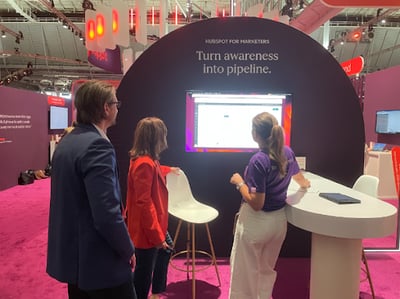 Rebecca and Kirill spent hours in the demo stations (Kirill says six. Rebecca will commit to at least three or four.). The people demoing weren't salespeople. They were the engineers and developers who built the products.
And they all worked with Breeze. At the start of a demo, they'd open Breeze Assistant, ask it a question, and know what to do next. They had completely reoriented how they work in HubSpot, and it was working.
How did we feel by the end? Overwhelmed. Rebecca and Kirill have each spent nine years in HubSpot, and for a minute Rebecca felt like she didn't know how it worked anymore. Kirill put it differently: a lot of what he already knows still works, but it's becoming obsolete, and he has to adjust. But be heartened, Just two weeks later, our team is feeling a lot better about using the tools.
Democratizing AI
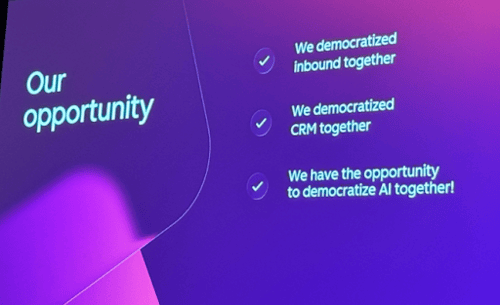
At the partner pre-brief, Yamini said HubSpot democratized INBOUND, then democratized CRM, and now it has the chance to democratize AI. Rebecca's assessment? HubSpot wants marketers and everyday users to get what they need done themselves, without leaning so hard on a partner.
The Sessions: What Monica Learned
Out of nearly 200 sessions, Monica went to about 15 (the average most attendees make it to is eight or nine). In past years, she struggled to get into full sessions and found a lot of content aimed at newer marketers. Not this time. If you missed it, HubSpot is posting main-stage sessions on its HubSpot Live YouTube channel.
The Words Everyone Was Saying
Starting at Partner Day, a few terms came up over and over throuhgout the conference:
- Outcomes Era: it's not about features anymore, it's about results. Will the AI get you more leads, faster deals, happier customers?
- Context: HubSpot calls it Growth Context. It's how your agents learn how your team works, your vocabulary, your business, and your ICPs, and it grows with every interaction.
- Security: controlling which people and which agents can see or change your data.
- Headless: you won't have to log in to HubSpot to do a lot of things, because your apps and agents will get in for you.
Now for the good stuff. Of the 15 or so sessions Monica attended, there were four that delivered the most practical advice, from rethinking where AI belongs in your go-to-market to getting found in AI answers and getting your emails read effectively by AI summaries.
Harrison Rose, Paddle/Goodfit: AI Should Pick the Targets, Humans Should Write
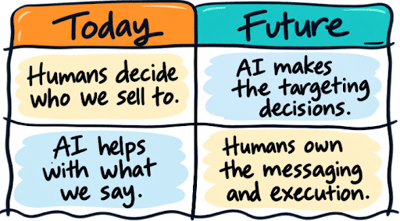
Harrison's main session point: most companies use AI in the wrong place, for execution like writing emails and scaling outreach. He expects that to flip. AI is better at targeting, so he encourages teams to let it decide which accounts to go after and let humans write the messages. His advice for evaluating any AI tool: treat it like a new hire. Figure out what it's good at and use it for that.
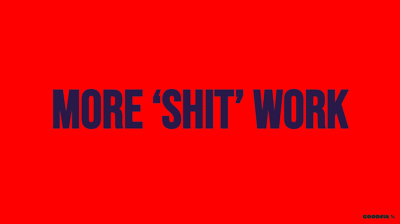 ...Harrison also had a very "cheeky" slide - he left this one up on the Innovation Stage for a couple of minutes during his talk, all bright red and about 12 feet tall. We giggled thinking that anyone walking through the massive show room hall would see this and likely be extremely confused. Harrison's point? When everyone first got their hands on AI, most teams used it to crank out the same low-value work faster, instead of using it smartly.
Aja Frost: A 30-Day AEO Checklist
Aja, HubSpot's former senior director of global growth, spent last year turning HubSpot's SEO team into an AEO team. Using millions of AI answers tracked in HubSpot's new AEO tool, she shared five things to do in the next 30 days:
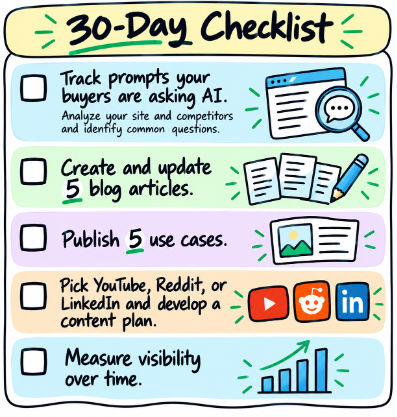 Track your prompts. HubSpot's AEO tool can gauge your site and your competitors' and suggest prompts to
monitor.- Create or update five blog posts. The blog isn't dead. Across 14 million AI citations, 62% pulled from blog posts or listicles. Write for how AI reads: FAQs at the bottom, question-style headings, and "last updated" dates on content you refresh.
- Publish specific use case and persona pages. Not "CRM software," but "CRM for real estate investors."
- Pick YouTube, Reddit, or LinkedIn and build a content plan. Backlinks don't predict AI visibility. One article in her research was cited 85 times with a single backlink. You need to have a presence on the three high-trafficked areas that the LLMs are pulling from to answer questions.
- Measure visibility over time. Don't celebrate or panic over one AI search result. The models keep changing, so you need to track over time. Just try to be the answer.
Marcel Santilli, GrowthX AI: Be the Best Answer on the Internet
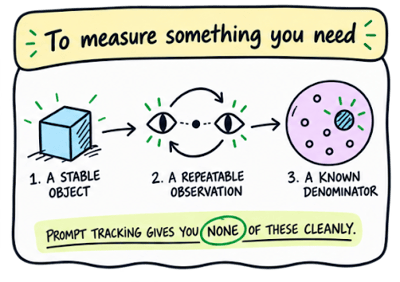 Marcel's session, What 10,000 Hours of AEO Taught Us, was so packed with information that Monica attended the 90 minute session twice. Marcel's first point was a warning: prompt analytics aren't real. To measure something, you need a stable object, a
repeatable observation, and a known denominator, and AI engines offer none of the three.
His alternative: be the best answer on the internet for everything your buyers care about. That starts with context documents covering who you are, what you sell, your ideal customers, and the jobs they're trying to get done. He called it the highest-leverage work in marketing. From there, map your category's "question universe," every way buyers might ask about what you do.
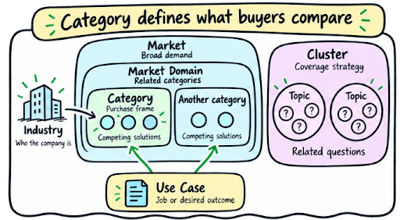
One caution if you're in a new category: meet buyers where the conversation already is. When GrowthX started
working with Lovable, "vibe coding" wasn't a term yet, so they marketed around low-code app building instead.
Jay Schwedelson: AI Is Reading Your Emails First
Jay's team runs about 40,000 email campaigns a year, so he sees what's working right now (and he'll be the first to tell you to test it on your own audience and be aware that things change quickly). In Do This, Not That, his focus was AI email summaries. Gmail, Outlook Copilot, and Apple Mail now show overviews before people decide to open, and his research found about 64% of those summaries misrepresent the intended message. His fixes:
- Put anything important in live text. If you can't highlight it with your cursor, the AI can't read it. Copy inside
images doesn't count, and neither does alt text. - Add plain text links next to image buttons. It's why old-school underlined links are showing up in emails from brands like TikTok, Spotify, and Asana.
- Use bullet points for key points. Summaries pull from bullets about 92% of the time in Copilot, 84% in Apple Mail, and 77% in Gmail.
- Lead with the action, the product, and the deadline. Save the slow storytelling intro for somewhere else.
- Test it. Run your email through an AI tool and see how it summarizes it

 In his main-stage session, The Next 5 Years Will Not Reward the Smartest People, Jay argued that since everyone
now has the same smart tools, consistency and accountability are what set people apart. He also shared a favorite prompt: build yourself a personal board of directors from five personas you admire, and have them debate your problem and ask you questions rather than hand you an answer.
And yes, we met him at the cocktail party. We were insanely happy about it.
Key New Products: What Kirill Showed Us Live
There were far more launches than we could cover. Kirill picked four that matter and are easy to explain, then demoed them during the briefing in a live portal. As he put it, HubSpot is now building everything AI first and prompt first, not UI first.
Breeze Assistant: Start Here Now
If you tried Breeze when it launched about a year ago, you probably found it clunky and unreliable. It's gotten much better. Think of it as a fully fledged LLM living inside your portal (it moved to the left side of the screen).
- It's your HubSpot expert. Before you ask ChatGPT or Claude how to do something in HubSpot, ask Breeze. It links to the knowledge base and often to the exact page you need.
- It creates documents, called artifacts. Start your prompt with "create a..." Each update is saved as a new version.
- It can build things. It can create workflows and agents and update records. It won't build marketing emails or sales templates yet. It writes the copy, and you build the asset.
- Claude can now talk to it. A new Claude-to-Breeze connector lets Claude prompt Breeze to do things in HubSpot that Claude can't do on its own.
In the demo, Kirill asked Breeze for a three-email sequence to re-engage contacts at manufacturing companies with closed-lost deals, plus a segment to target them. Because he was in Agent Hub, Breeze decided he wanted an agent and built one, complete with its role, goal, and instructions. When he asked again from the Contacts screen, it created an artifact instead. Breeze responds differently depending on where you are in HubSpot.
In an earlier test, Kirill asked it to add the registration link for this very webinar. It found the marketing event in HubSpot and pulled the link into the email on its own.
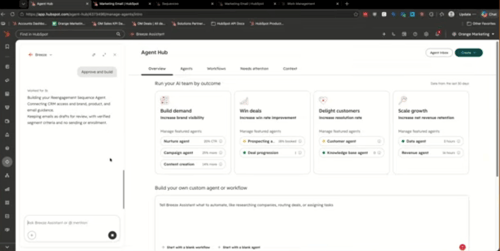
Agent Hub: The Future of HubSpot Automation
Despite the name, Agent Hub isn't a new Hub, and it isn't only about agents. It's where you monitor and edit agents, create new ones, and build workflows in the new workflow builder. Inside it you can:
- Have Breeze write your agents. Kirill's advice: don't bang your head against the desk writing agent prompts yourself. Breeze is way better at it than you are.
- Track each agent. Every agent has its own dashboard, and a Needs Attention tab flags problems.
- Manage your Context. This is where you set your brand kit, ICPs, personas, tech stack, and even how you personally like to write.
Check that Context for accuracy. HubSpot fills some of it in from your web presence, and it decided Orange Marketing uses Eloqua because we published an Eloqua case study. We don't. The more accurate this is, the better every AI tool in HubSpot works for you.
The new workflow builder. You can now drag action cards anywhere on the canvas, instead of managing an impossibly wide tree of branches. You can also prompt it. Kirill asked it to enroll closed-lost deals into a nurture, and it got him most of the way there. Two limits for now: there are no suppression lists or unenrollment rules yet, so use the legacy builder when you need those. The upside is much cleaner re-enrollment.
Nurture Agent: Marketing Email Personalization at (Some) Scale
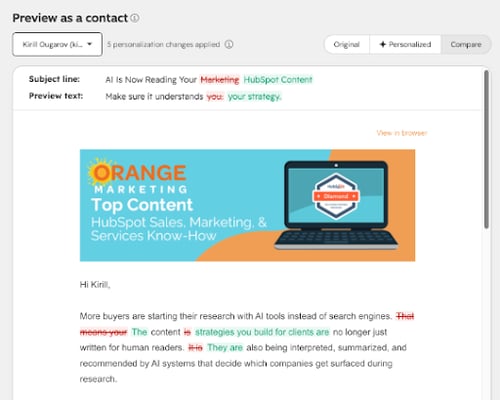
Nurture Agent personalizes an automated marketing email for each contact right before it sends. It's "some" scale because every personalized email uses credits, but you can choose what percentage of a send gets personalized. For small nurture audiences, you might personalize all of it.
- It only appears after you publish. Once your automated email is live, you'll see "Personalize with Nurture Agent."
- You choose the data. Add contact, company, activity, deal, and other properties, and choose whether to use your brand voice.
- You can preview it three ways. See the original, the personalized version, and a redline view of what changed.
- You can lock anything. Lock specific text blocks, the subject line, or the preview text so they're never rewritten.
In the demo, a contact at a nonprofit got copy about donors and community members instead of buyers. A contact at a physical security company got copy about buyers researching security solutions. As Kirill said, this level of personalization used to be possible only in sales emails. Now marketers can do it too.
HubSpot Work: AI-First Project Management
Work is HubSpot's new project management tool, and the first product it designed AI first. It's in beta (enroll through Product Updates), only requires a Core seat, and doesn't use credits yet. It has board and table views like any PM tool, and you drive it from a prompt box called the Omnibar. Kirill pasted in a screenshot of an existing task board, and it recreated every task.
It isn't connected to any HubSpot objects yet, but we expect that's coming. Think of it as a basic version of Monday.com. We currently pay about $250 a month for ClickUp, and we'd love to move our projects into HubSpot instead.
Your Questions: Credits and Where to Start
Our briefing ended with a lot of attendee questions:
Do the agents cost extra?
Mostly, yes. Nearly every agent run uses credits, though every subscription includes a monthly allotment. One attendee pointed out that many agents use 100 credits per run, so a Starter portal's credits can go fast. HubSpot clearly wants everyone using agents, we've heard credit prices may come down, and if you have an aggressive use case, there's room to negotiate. Check HubSpot's Credits Rate Sheet to see what costs what.
Do workflows in Agent Hub cost credits?
No, at least not yet. The new workflows run automation just like the old ones. You're only charged when a workflow calls an agent.
Which agent should we try first?
It depends on your team:
- Marketing: start with Nurture Agent.
- Sales: try Prospecting Agent, if you have a supported data provider like ZoomInfo or Seamless.
- Service: if you have good documentation and history, Customer Agent can take a big load of easy questions off your team.
Watch the Full Recording
We left UNBOUND very bullish, and we hope you caught our vibes. Want to see it all, including Kirill's full live demo and the Q&A? The whole UNBOUND Unpacked session is available on YouTube.