Orange Marketing
-1.png)
After a whirlwind of HubSpot releases surrounding UNBOUND 2026, things are a little quieter this week, but the updates that did arrive continue the push toward using AI to turn the data already inside your CRM into action.
This week, we’re looking at two new capabilities for the week of October 5, 2026:
- Customer Agent Now Generates Knowledge From Your Ticket, and
- Deal Progression: Next Best Actions and Deal Plans.
Customer Agent Now Generates Knowledge From Your Ticket
Customer agent can now generate FAQ-style knowledge from your resolved support tickets and import it directly — no manual writing required. You review each generated answer before anything goes live, and PII is scrubbed automatically.
Your ticket history already contains the answers your customers are asking for. This feature surfaces that knowledge automatically so you don't have to recreate it from scratch — and new portals can get a working agent up and running without authoring a knowledge base first.
How does it work?
- Select your source: In the Knowledge section of Customer Agent setup, click Add content → Generate Knowledge. Choose your ticket scope: all resolved tickets or a specific subset. Only human-responded tickets are used. Optionally add topic guardrails to include or exclude specific topics, or connect an existing Customer Agent to skip content it already covers.
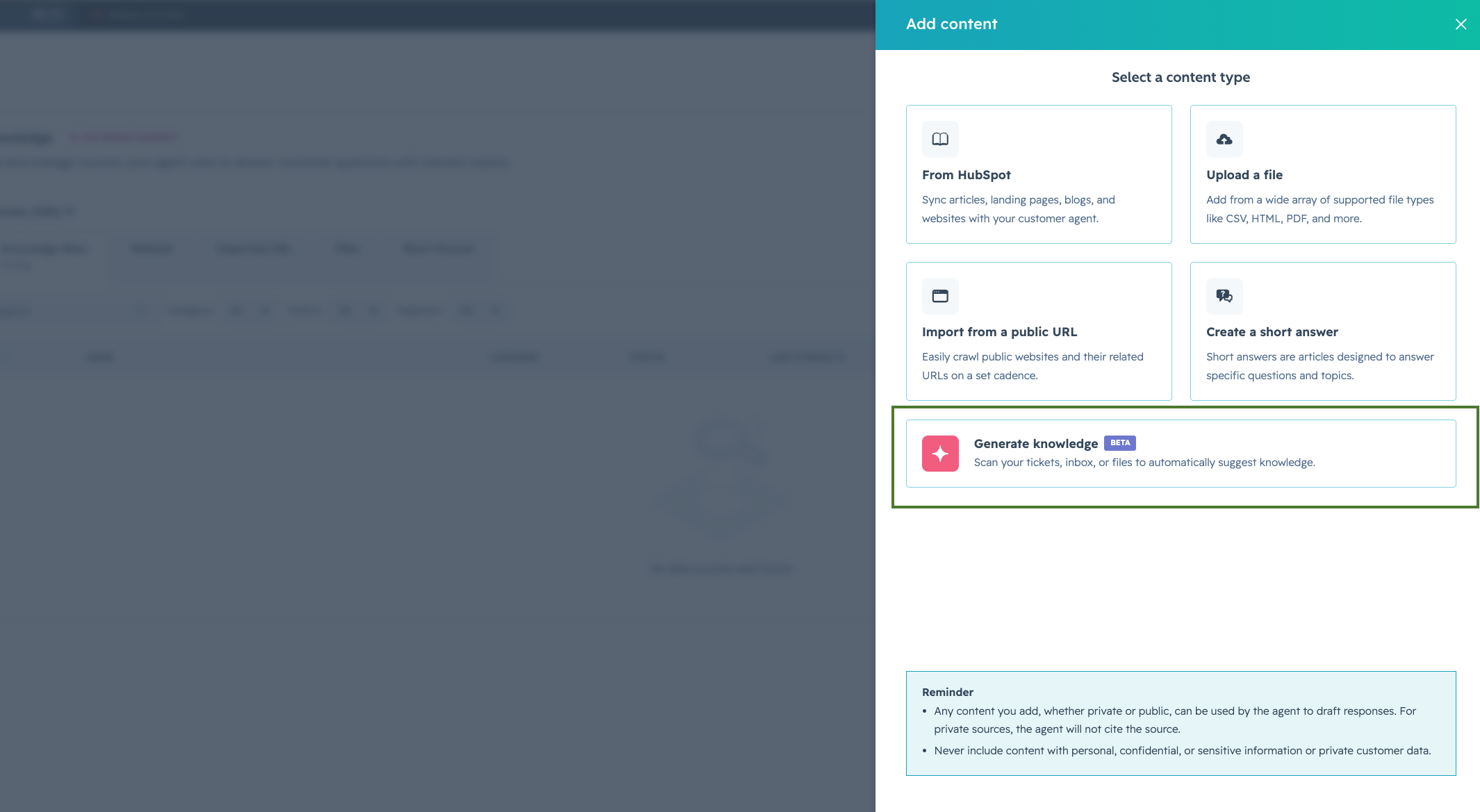
- Let the engine cluster and generate: After you kick off the job, Customer Agent clusters tickets by topic and generates a short answer for each one. You'll be notified when it's complete, typically 5–10 minutes depending on your selected ticket volume. You can stay on the page or come back; results will be waiting.Note: You can only run one generation job at a time. To rerun a job, you can "Dismiss all" and start a new clustering process.
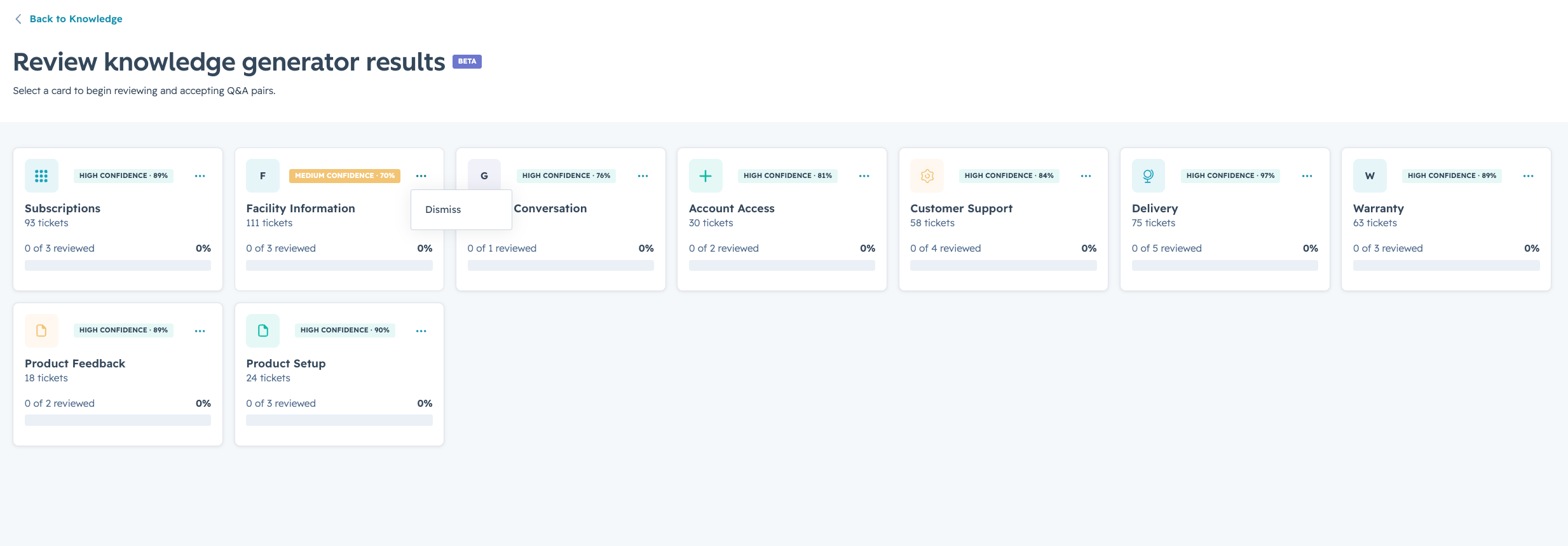
- Review and import: Results are organized by theme and confidence. Accept, edit, or decline each Q&A pair individually or bulk dismiss any entire theme. Approved items are imported as knowledge sources (as Markdown files) and go live immediately.

Deal Progression: Next Best Actions and Deal Plans
Deal Progression eliminates post-conversation manual work so reps can focus on winning deals. Using your emails, call transcripts, notes, and deal context, HubSpot automatically:
- Suggests or auto-approves CRM updates to keep your pipeline accurate.
- Surfaces Next Best Actions so critical opportunities are never missed.
- Drafts personalized follow-up emails based on real buyer interactions.
After each interaction, reps can quickly review and approve these updates directly on the deal progression card giving them everything they need to understand deal status and act on it.
Before the next call, deal progression updates deal plans and surfaces methodology-driven context so reps enter every meeting fully prepared with a clear, complete picture.
Why this matters
Deals rarely stall because of bad strategy. They stall because execution breaks down between conversations. Instead of forcing reps to hunt through endless meetings and call transcripts, notes, and emails to figure out what to do next, HubSpot now synthesizes those signals into a clear, confident next best action. And when your sales methodology is configured, those recommendations reflect how your team actually sells. Less time reconstructing context more time selling.
What to expect
The New Catch-Up Tab
This is your new command center for deal progression. It brings together everything you need to understand and act on directly on the deal record.
The tab includes two new additions:
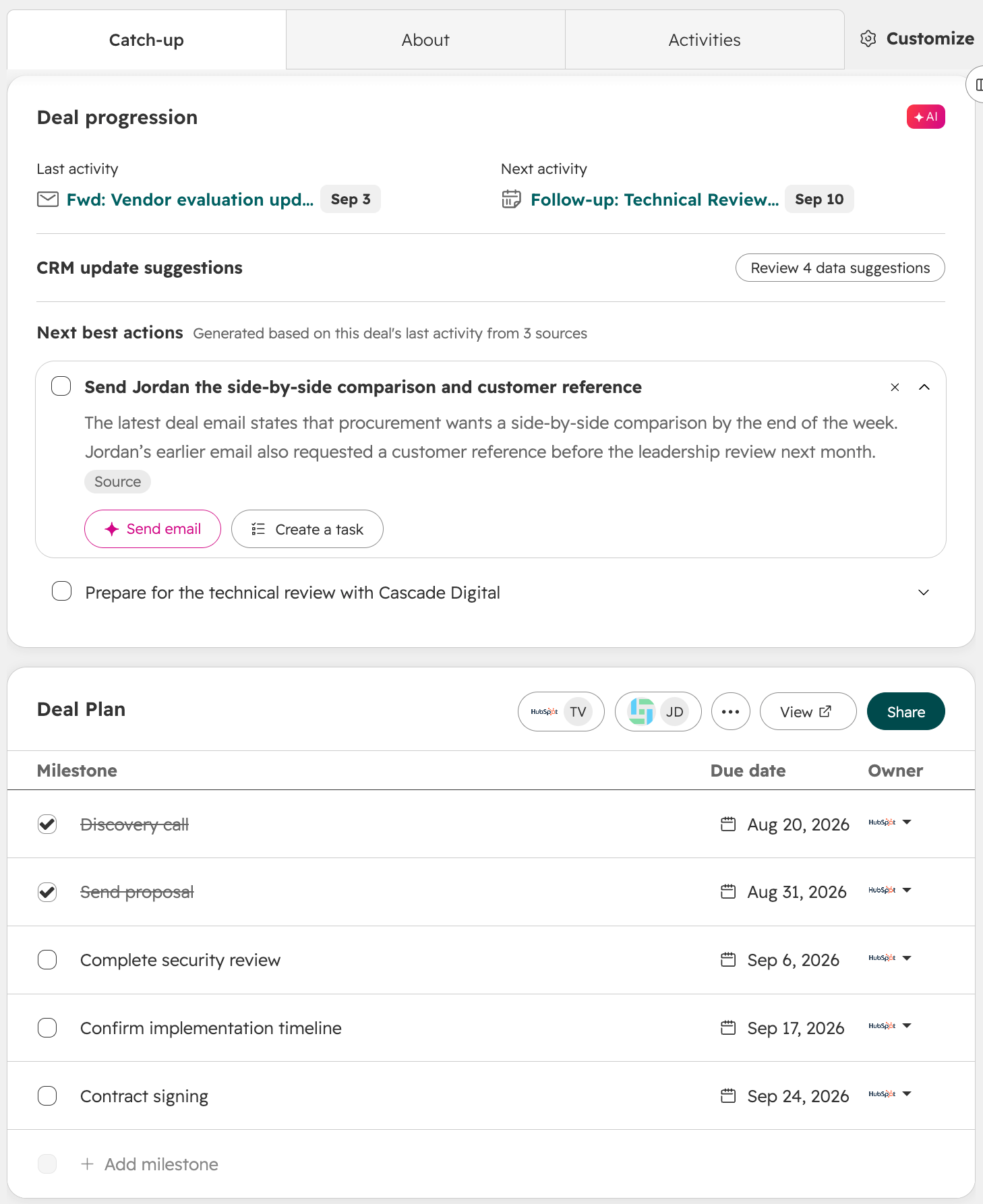
- Deal Progression Card and Next Best Actions: The Deal progression card gives reps and managers everything they need to understand deal status and act on it. This card includes:
- Next best actions: Prioritized next steps generated from your call, meeting, and email context. With all your deal context in HubSpot including sales methodology, you never have to guess what will move your deal forward.
- Last Activity: See the most recent engagement on the deal at a glance. No more digging through the timeline.
- Next Activity: Know what's already scheduled so you never double-book or miss a committed next step.
- CRM Updates: See suggested data changes to your deal record surfaced directly on the card — keep your CRM accurate and up to date without leaving the deal record
- Mark as Complete: Check things off your list as you act on them to keep your view clean and current.
- Re-Engage CTA: When a deal is stalled and has had no activity for 14 or more days, a dedicated re-engagement prompt surfaces automatically with three direct options: draft an email, make a call, or schedule a meeting.
- Deal Plans: Generate a branded, shared buyer portal directly from the deal record, where sellers and buyers track milestones, ownership, and next steps in one place.
- Generated from context: HubSpot drafts the plan using the existing brandkit and admin-configured templates, so reps aren't starting from scratch.
- Buyer-facing: Share a clean, polished link with buyers with no HubSpot login required.
- Always current: As deal progression updates the CRM, deal plan milestones stay in sync with suggestions surfacing automatically on the card itself.
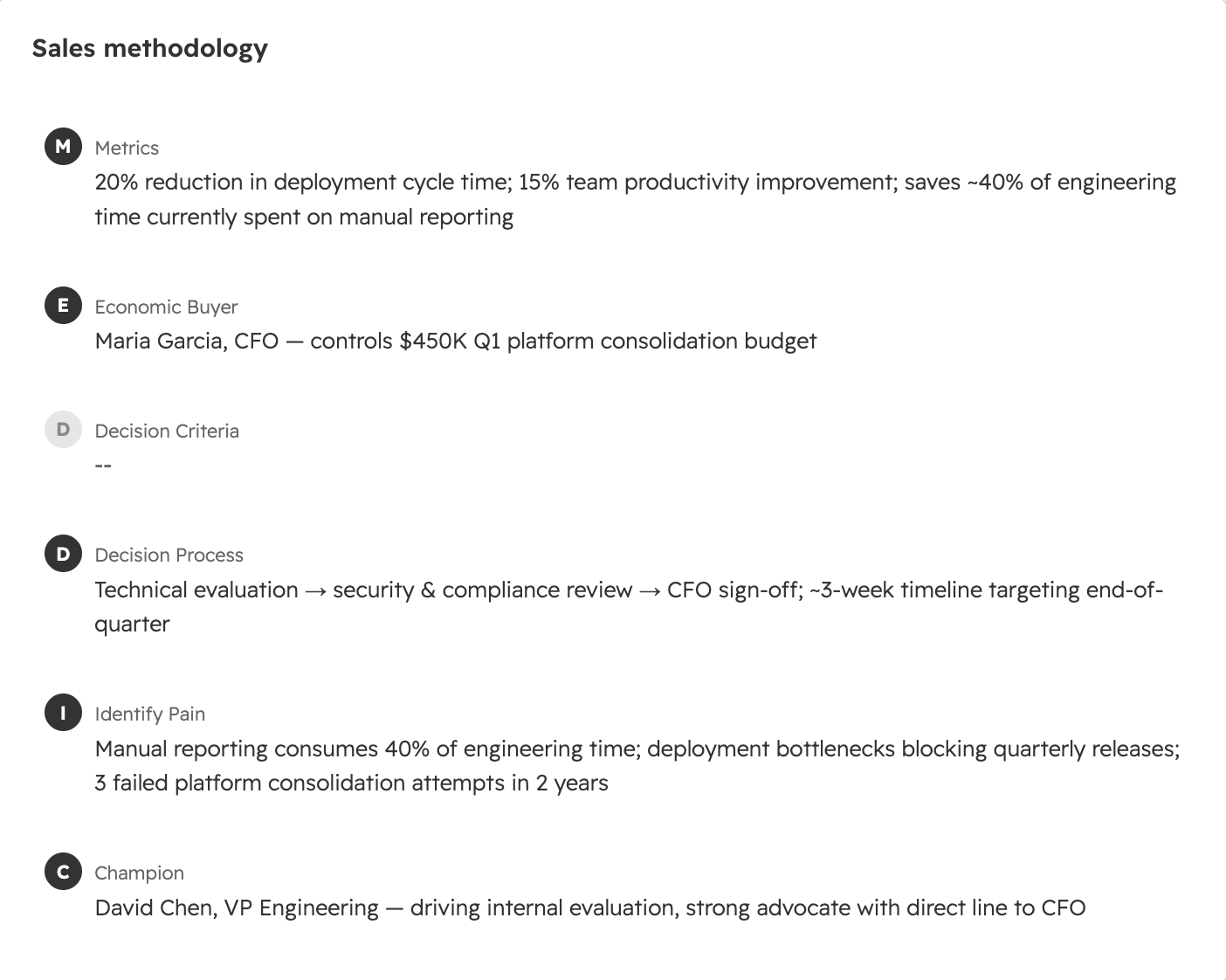
- Sales Methodology: When a qualification framework is configured (MEDDIC, BANT, SPICED, and others), the Catch-Up tab shows real-time progress against your criteria.
- Personalized suggestions: Recommendations reflect your team's qualification criteria, not just generic deal signals.
- Automatic property updates: Methodology-linked CRM properties update from buyer conversations without manual entry.
- Gap visibility: See exactly which criteria are met, which are missing, and what to do about it — all inline on the deal record.
The tab also surfaces existing tools like Deal Insights and Predictive Deal Score for a complete view of deal health.
Note: The Catch-Up Tab appears automatically for everyone. If your portal uses a default layout, the Overview tab will be renamed to About. If you use a custom layout, your Overview tab remains unchanged.
Email Action Items & Follow-up Drafts
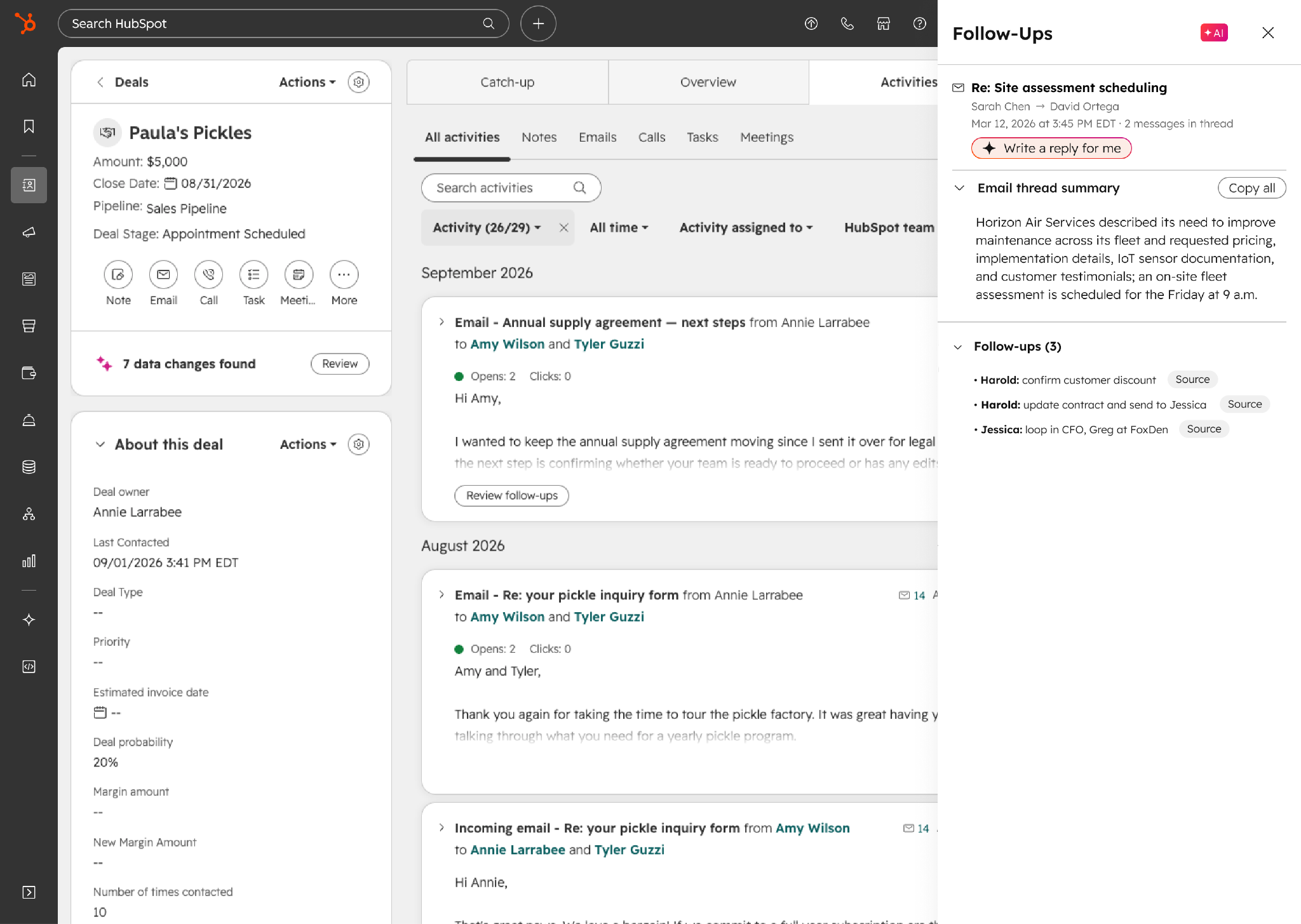
HubSpot now extracts insights directly from high-signal email threads to keep deals moving:
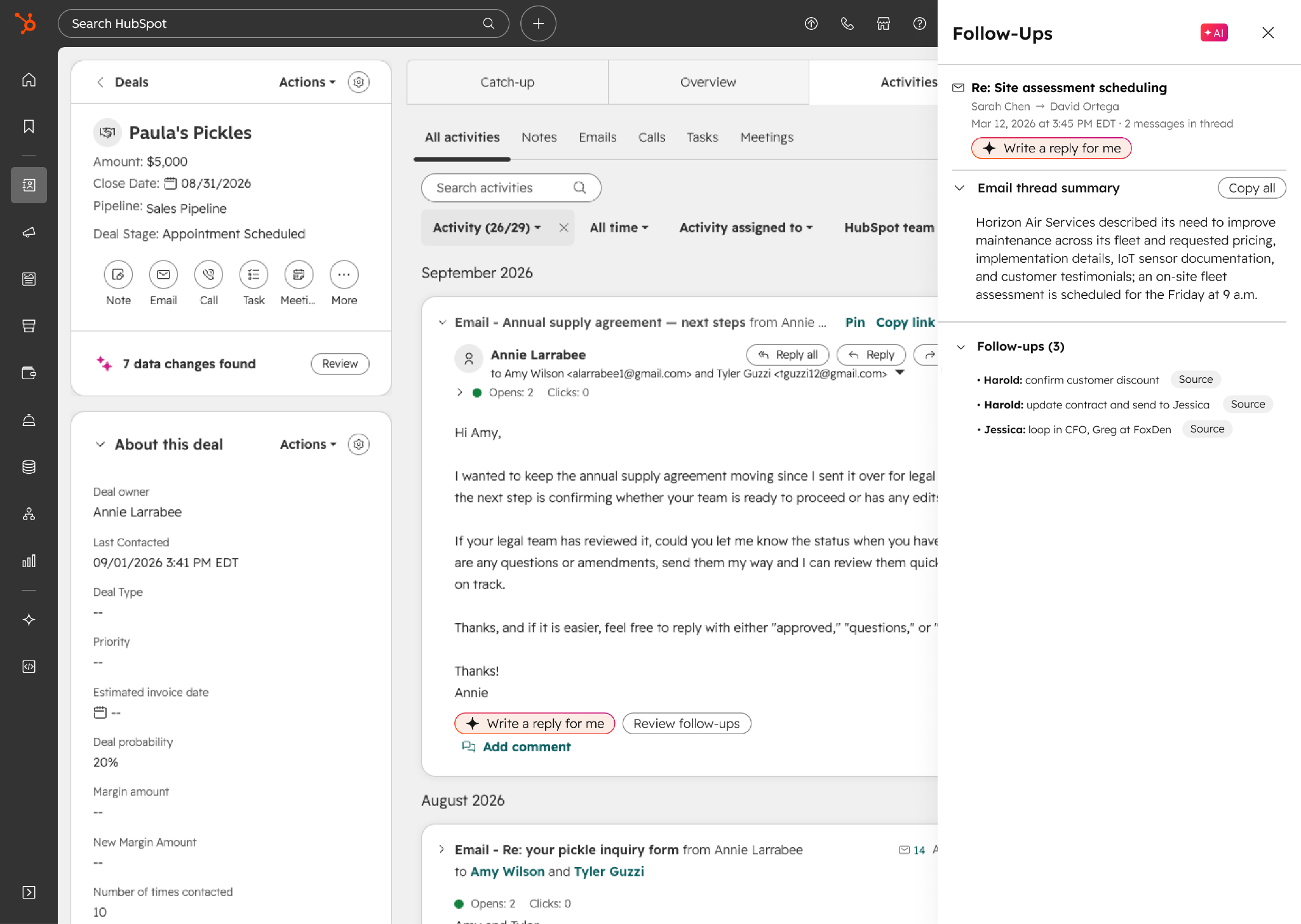
- Email Thread Summary: Never lose the thread. AI instantly summarizes your email history so reps can jump back into any deal conversation — no scrolling, no re-reading, just context on demand.
- AI-Assisted Email Replies: When a high-signal email lands, generate a smart draft reply right from the deal timeline — grounded in full deal context, ready for reps to review, edit, and send.
- Action Item Extraction: Outstanding tasks are identified and assigned to the right person (rep or buyer) inside the deal timeline and Gmail extension.
How to view in Gmail: Open the HubSpot Chrome extension on an associated email thread. In the sidebar, find the Deals on this email thread section and click Preview to review the action items and updates.
AI-Assisted Email Replies
When a high-signal email arrives, reps can generate a draft reply directly from the deal record timeline.
- Deep Context: Drafts are grounded in the entire email history, deal stage, buyer goals, risks, and recent activities.
- Rep Control: The AI creates the baseline, leaving reps in full control to review, edit, and send.
How to set it up
Please opt in the public beta and follow these two steps:
- Turn on conversation recording at Settings > Tools > Recording & Transcription. You can capture audio via the HubSpot Notetaker bot (for Zoom, Google Meet, or Teams), HubSpot calling, the iOS mobile app, or direct calendar integrations.
- Configure your automatic CRM update preferences by selecting your desired Deal properties under Settings > Data Management > Data Capture.
Optional: Enhance your setup:
Note: Both Sales Methodology and Deal Plans need to be explicitly activated by an admin, via the settings paths below, before the cards can be displayed on the Deal record.
- Sales methodology: Configure your qualification framework at Agents > Agent Hub > Context > Team & Processes. HubSpot will auto-suggest methodology and property mappings based on your existing deal properties.
- Deal plans: Admins can set up deal plan templates and approve AI-generated content at Objects > Deals > Deal Plans. Sales reps can generate plans directly from the Deal Plan card in the Catch-up tab of the Deal record.
Configure CRM Updates with Smart Data Capture
For CRM update suggestions from email interactions, admins can configure which Deal properties are included and which users, calls, and meetings to target. Navigate to Settings > Data Management > Data Capture.
Turn HubSpot Into A Growth Engine
As HubSpot continues to add more AI, automation, and intelligence across its platform, the opportunity for software companies is bigger than ever, but getting real value from those tools takes the right strategy, setup, and execution.
Orange Marketing helps B2B software companies get more from HubSpot while building marketing and revenue programs that support growth.