Orange Marketing
This week’s HubSpot updates are all about taking AI beyond simple answers and making it easier to turn insights into action.
The HubSpot connector for Claude now offers a dedicated workspace for managing CRM tasks and follow-ups, while Breeze Research takes AI-powered analysis a step further by investigating complex questions and delivering structured reports with actionable recommendations. Both updates reflect HubSpot's continued push to make AI a more useful part of everyday workflows.
Here are our favorite two updates for the week of November 16, 2026:
- HubSpot Connector for Claude: New Experience and Pinned App in Claude, and
- Breeze Research: from Question to Action Plan.
HubSpot Connector for Claude: New Experience and Pinned App in Claude
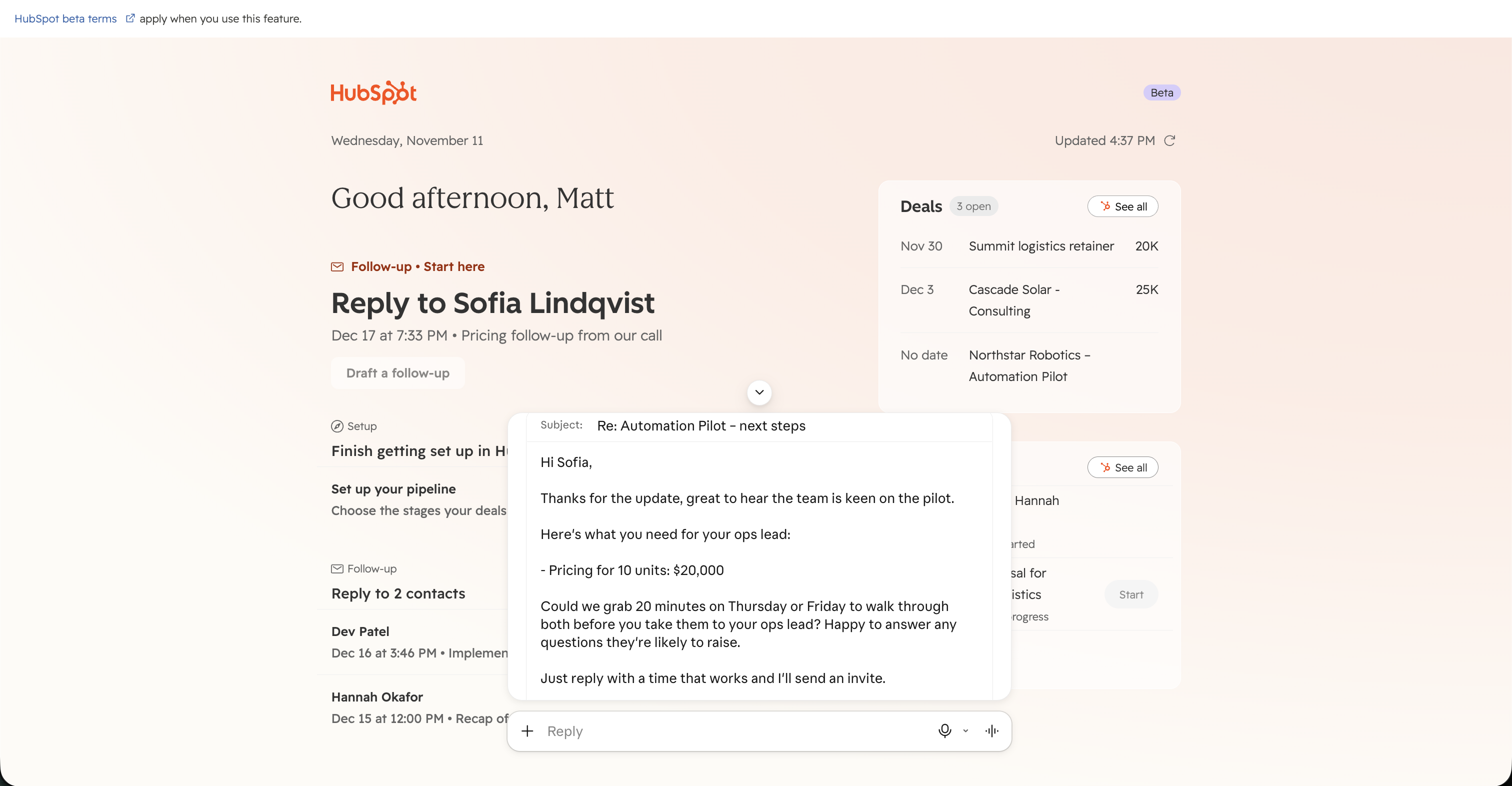
The HubSpot connector for Claude now offers a new full-screen experience that you can pin to your Claude sidebar for quick access.
See which contacts are waiting on a reply, review and create tasks, and manage follow-ups in one place. You can also ask Claude questions about your HubSpot data and take action on CRM records directly from your chat in Claude.
Why does it matter?
Keeping track of customer follow-ups often means switching between your inbox, CRM records, and task lists to figure out what needs attention.
With the new HubSpot experience in Claude, you can see contacts waiting on a reply and open tasks in one place, making it easier to prioritize your next steps.
Start a follow-up task, use Claude to draft an email based on your HubSpot context, and review it before sending. You can also create new tasks, get answers about your CRM data, and update records from the same workspace. That means less time searching for context and more time moving customer conversations forward.
How does it work?
- Access HubSpot in Claude: Open Artifacts from Claude's left sidebar and select HubSpot. Pin the app to your sidebar for quick access anytime.
- Complete your setup: If you're new to HubSpot, follow the start guide to complete setup tasks, such as connecting your inbox or importing contacts.
- See what needs attention: View open tasks and contacts waiting on a reply. Click Start on a task to begin working on it, or create a new one using the + Write a task field.
- Complete follow-ups: Start a follow-up email task to have Claude generate a draft using your HubSpot data. Review the draft, then copy it in HubSpot to send. Mark the task as complete when you're done.
- Work with your HubSpot data: Ask Claude questions about your contacts and deals, update CRM records, and log activities, based on your existing HubSpot permissions.
Breeze Research: From Question to Action Plan
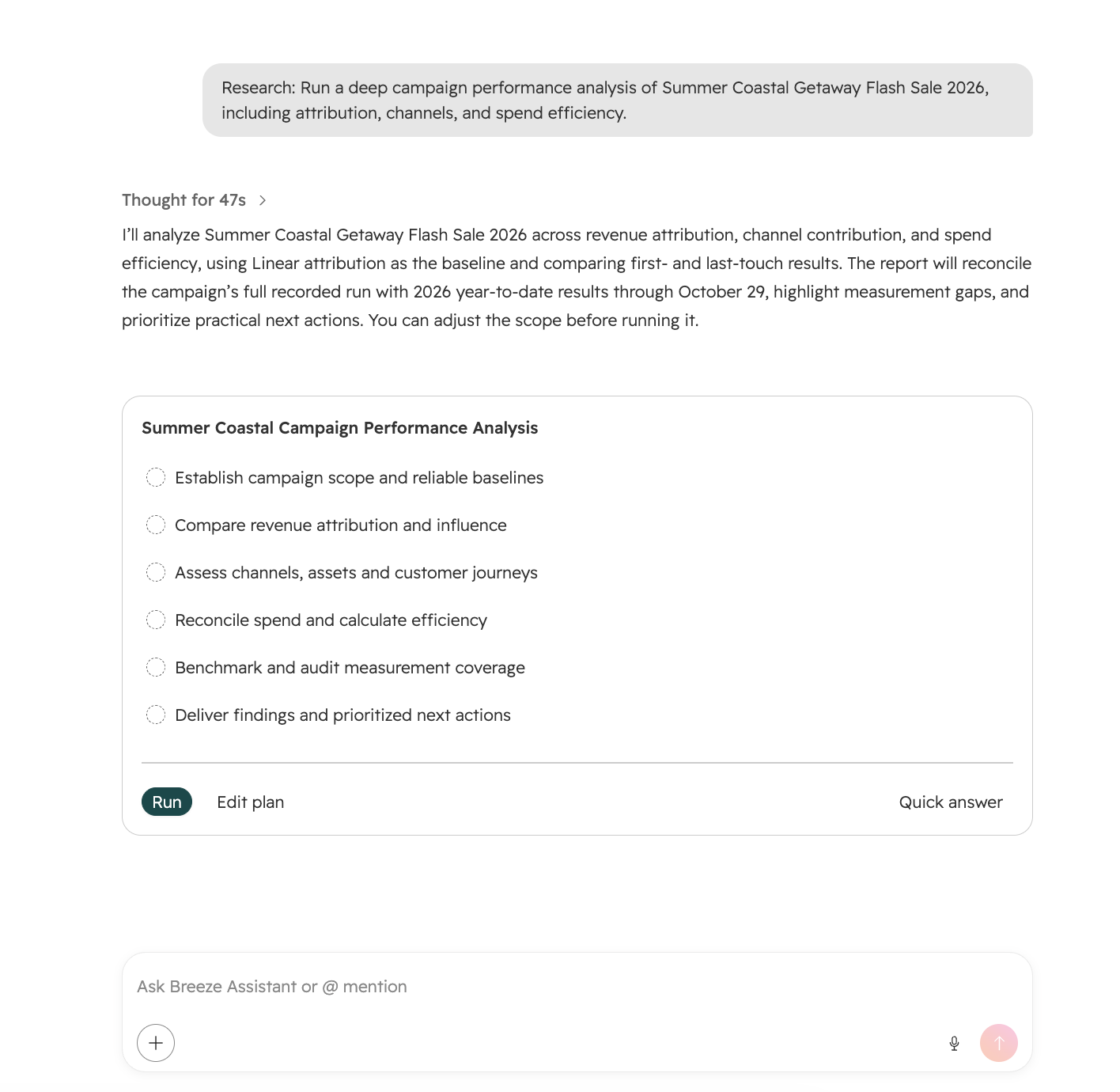
Breeze Research is a deeper investigation capability in Breeze Assistant. Instead of answering a question in one shot, Breeze builds a plan, works through the relevant data step by step, and returns a structured report with findings and recommended next actions.
Why does it matter?
Surface-level answers are not always sufficient for questions that require synthesizing data across multiple sources, identifying patterns, and determining a course of action, which typically demands significant manual analysis. Breeze Research performs that analysis end-to-end and delivers a decision-ready report, not just a data point.
How does it work?
Breeze Research is available in any Breeze Assistant conversation.
- Users kick off a research run with a single click on the "+" action.
- Breeze immediately surfaces contextual suggestions based on the page the user's on, or they can simply describe what they want investigated in their own words.
- Breeze responds with a clear plan for how it will tackle the question, which users can run as-is, fine-tune, or bypass for a quick answer instead.
- The plan stays live through on-topic follow-ups, and only evolves to a new version when a follow-up genuinely changes what needs investigating.
- Once the research starts, users watch the plan execute step by step, with visible progress throughout.
- At the end of the research run a structured, decision-ready report with summary, findings, and recommended actions, is delivered right in the conversation as an artifact.
Users can step out of the research flow at any time by simply change the subject or pick "Quick answer". Research runs started can also be stopped with the main Breeze Stop button.
Is Your HubSpot Portal Ready For What's Next?
With HubSpot continuing to roll out new AI tools, integrations, and automation capabilities, there's never been a better time to take a closer look at how your portal is performing.
Are you making the most of the features available to you, or are outdated processes, underused tools, and missed opportunities holding you back?
Orange Marketing's 2026 HubSpot Portal Audit Report explores common challenges and opportunities for improvement to help you get more value from your HubSpot investment.