Orange Marketing
%20(32).png)
June is off to a strong start with updates that touch customer success, sales operations, and reporting. While it’s a lighter week overall, the features HubSpot released address some common challenges teams face as they scale, maintaining a consistent definition of a customer, managing complex pricing structures, and getting clearer answers from reporting data.
Here are a couple notable updates for the week of June 1, 2026:
- Current Customer Property,
- Price Books, and
- Report Drilldown Refresh.
Current Customer Property
Current Customer System Property creates a single, system-managed property to identify whether a company, contact, or custom object is a current customer. This property will be used in the Customer Success workspace to ensure CSM's views are useful and easily updated.
Why does it matter?
Customer Success teams need a consistent, reliable way to distinguish current customers from past or churned ones, enabling accurate views, summaries, and predictive features.
This solves the pain of fragmented approaches and manual setup, helping users focus.
This property will offer a default and also allow customers to adjust or modify this default to be more specific if needed. This property will make it easy to apply this definition consistently across HubSpot's tools.
How does it work?
Navigate to Customer Success workspace settings. New customers will see a default of lifecycle stage = customer and they can either keep it or modify it through one of the following options:
- Lifecycle stage: Select which lifecycle stages count as current.
- Single property: Choose a property and define which values mean current.
- Advanced filters: Use the filter builder to set custom logic.
This property will be used as a default filter on all customer views created in the CS workspace.
Existing customers will be able to set this property as well and will not have a default applied to their existing views but they can add this property to their views if they'd like.
Price Books
Price Books are now available, giving RevOps teams a centralized way to define, manage, and apply product pricing across deals and quotes.
This first release focuses on enabling structured pricing setup and basic end-to-end usage within deals and quotes.
Why does it matter?
As pricing grows more complex across segments, geographies, and deal types, managing it manually can lead to inconsistencies and errors.
Price Books help standardize pricing, reduce manual effort for sellers, and ensure deals and quotes reflect the correct prices—improving speed and accuracy across your sales process.
How does it work?
Watch this video for a walkthrough.
In your HubSpot account:
- In the left sidebar menu, navigate to Commerce > Products
- In the top right, click Manage price books
- On the price books index page, click Create price book
- In the creation form, enter a name, description, and currency, then click Create
- On the price book details page, click + Add products
- Select the products you want to include, then click Add
- Update pricing details as needed, including unit price, billing frequency, and term
- When you're ready, click Activate to make the price book available for use
Once activated:
- Sellers can select an active price book from the deal line item editor
- Only products included in the selected price book are available to add as line items
- Line item pricing is sourced from the selected price book
- Quotes generated from the deal use the same price book pricing
- Sellers can change the selected price book on a deal, or choose line items directly from the product library, depending on their workflow
Current limitation: Price Books support single-currency accounts only. Multicurrency account support is not included in this release.
Report Drilldown Refresh
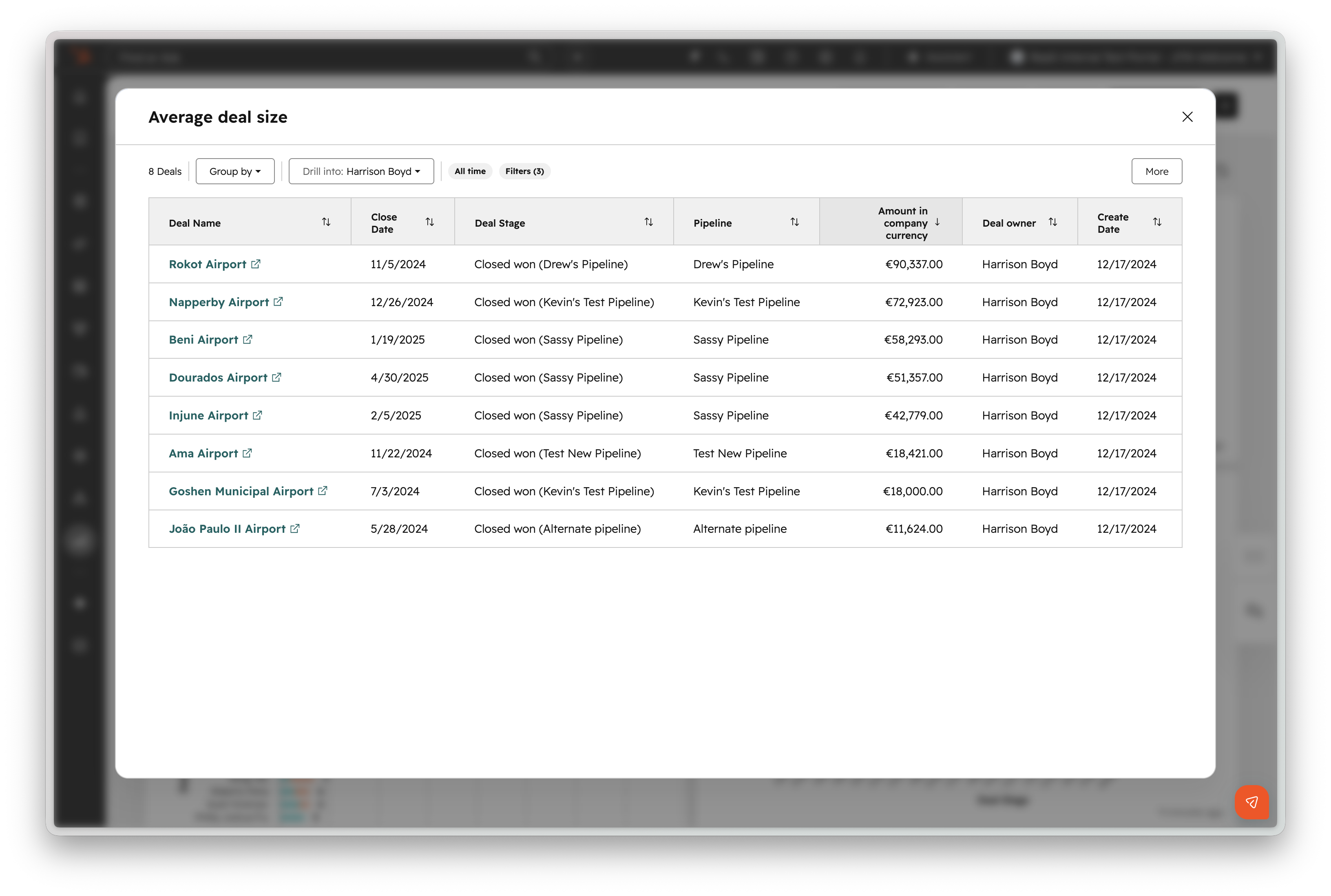
Report drilldowns are getting refreshed to help you get the answers you need consistently and more easily, right from the report. A drilldown helps you understand exactly what information is driving your metrics, such as pipeline stage performance.
Why does it matter?
You need to understand what's happening in your business before you can make informed decisions — and to take action, you need to understand your data quickly and easily. By making drilldowns more specific and flexible, you can work with your data, understand the full picture, and take informed action faster.
How does it work?
Click any data point in a report to load the drilldown view.
Changes include:
- A clearer title bar that explains what you're looking at
- Easier to find "Group by" option
- Added new "Drill into" option to get more granular information
- More visible filters
Want to Get More Out of HubSpot?
Whether you're managing complex pricing, building a stronger customer success process, or trying to make better decisions from your reporting data, the right HubSpot setup can make a major difference in how efficiently your team operates.
Orange Marketing helps B2B companies optimize, implement, and scale HubSpot across marketing, sales, and customer success teams.
Learn more about our HubSpot services and how we can help you build systems that support growth.