 Orange Marketing
%20(37).png)
We hope you had a great Fourth of July weekend! As we ease back into the week, HubSpot has a couple of updates worth checking out, both aimed at making migrations and financial operations smoother. Whether you're transitioning from Legacy Quotes or syncing invoices with QuickBooks Online or Xero, these enhancements help reduce manual work and improve accuracy.
Here's what's new for the week of July 6, 2026:
- Quote Template Migration Tool, and
- Improved Outbound Customer Mapping for QBO & Xero.
Quote Template Migration Tool
Admins can migrate a standard Legacy Quotes template to Commerce Hub Quotes. This generates an editable Commerce Hub Quote template and a migration report in one flow.
Standard template in this case means the template has not been edited in the Design Manager or cloned into a custom version.
Customers will need access to both Legacy Quotes and Commerce Hub Quotes
Why does it matter?
Migrating templates is often time consuming and manual. Customers typically need to reference content from legacy templates and rebuild it within the new system, which adds significant effort to the process. This extra layer of manual work can slow adoption and make migrations more challenging overall.
How does it work?
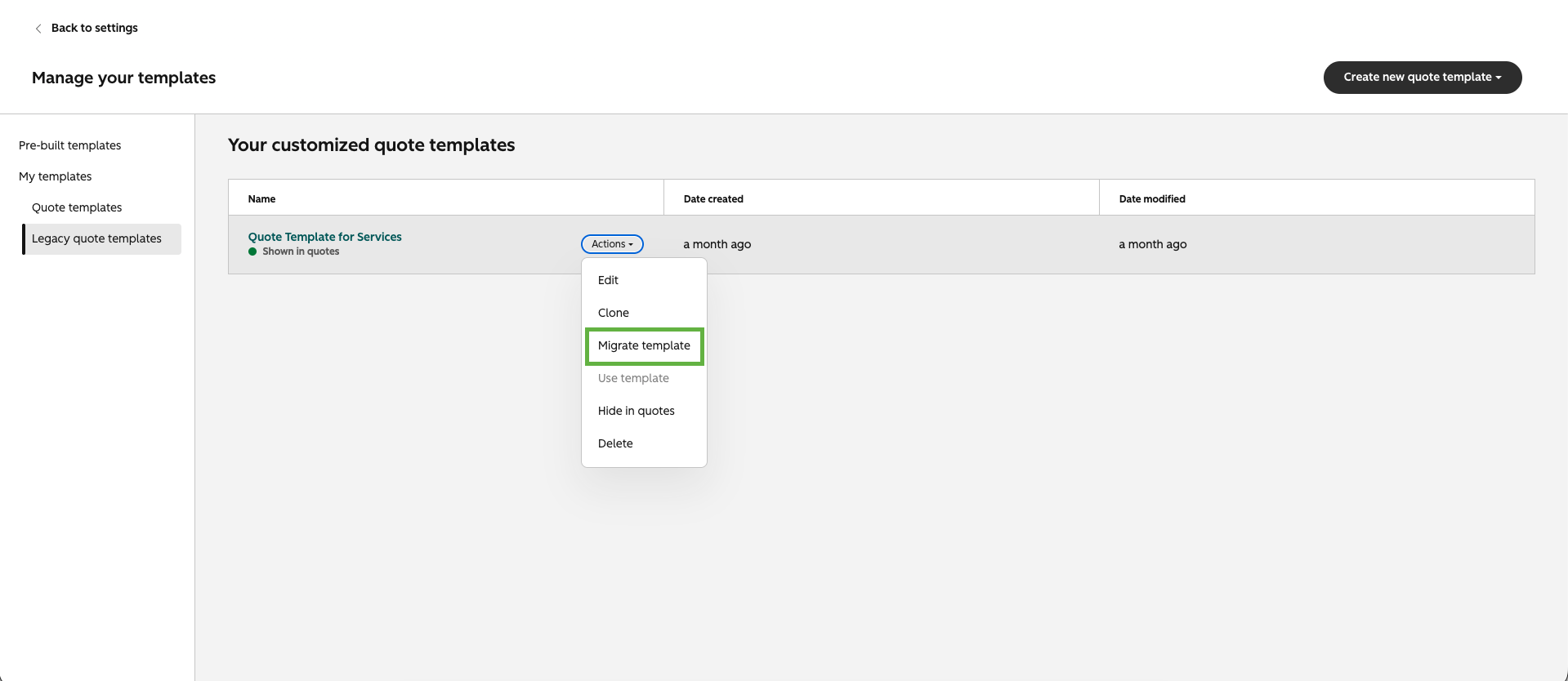
Navigate to Commerce --> Quotes --> Settings --> Quote Templates
- Click on the Open template library
- Navigate to Legacy Quote Templates
- Hover over your customized templates and click on "Actions"
- Click Migrate template
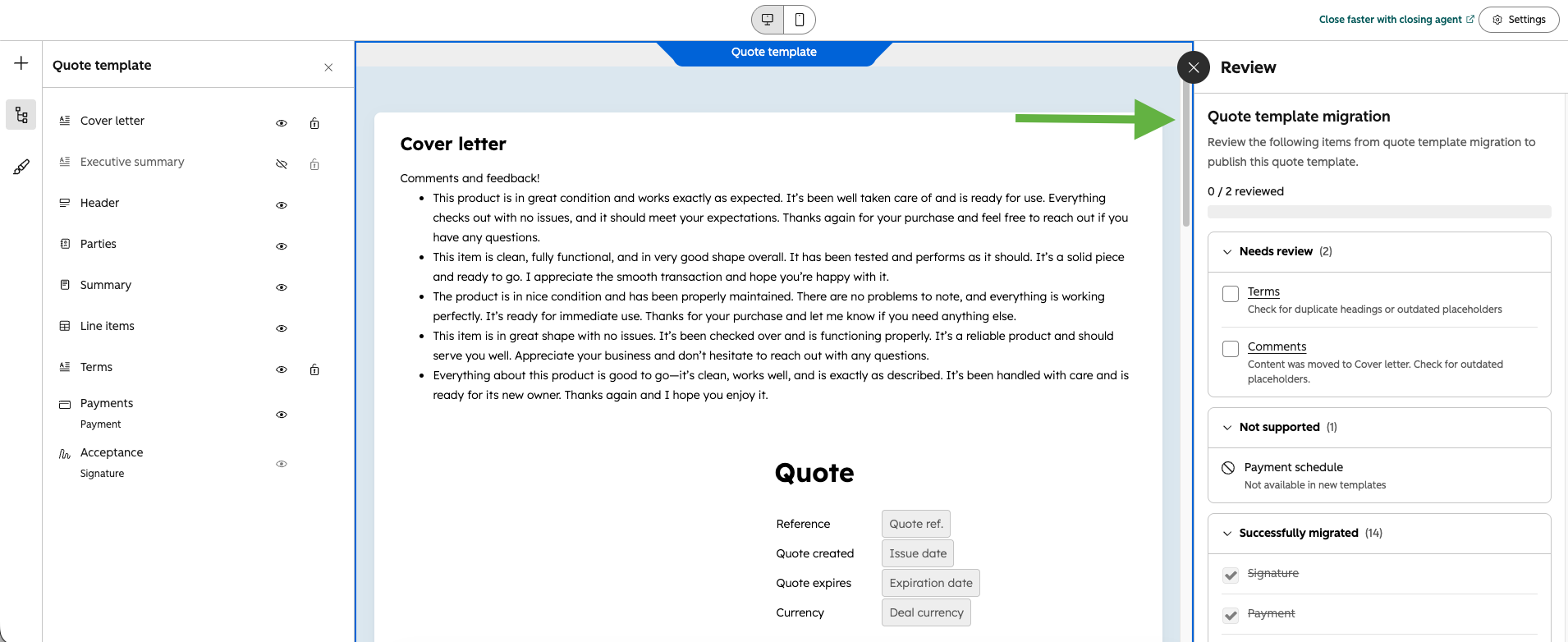
Once the template is migrated, you'll see a checklist showing what's been migrated and what hasn't. As you go, you can check off each section for a clear view of what's been moved from the legacy experience to Revenue Hub.
Improved Outbound Customer Mapping for QBO & Xero
HubSpot records can now be persistently mapped to customers in QuickBooks Online and Xero using stable HubSpot contact and company IDs instead of emails, enabling reliable syncing of outbound billing data. Users can review, confirm, and manage these mappings through a dedicated interface. Once mappings are enabled, users can bill any contact at a particular company in HubSpot and the Invoice will sync across to the appropriate customer in the accounting system, regardless of the billing contact selected.
Users experience duplicate customers and invoice sync errors when contacts change or have no email, causing cleanup burdens and failed workflows.
Our new customer mapping engine ensures accurate, persistent connections between HubSpot and accounting customers, supporting real B2B billing scenarios and reducing duplicate records and errors.
How does it work?
Watch demo here!
- Entry point: Eligible users see a banner on the CRM syncs page in DataSync with a 'Set up customer mapping' button.
- Generate mappings: After setup, HubSpot matches QBO/Xero customers to HubSpot contacts/companies with a progress indicator. Syncing waits until confirmation.
- Review & confirm: Users review mapped and unmapped records, can remap as needed, and confirm mappings.
- Ongoing management: A standalone Mappings page allows continued review and manual remapping.
- Unmapped records: These are shown for reference; no action is required unless invoicing for those customers occurs in the future.
Prerequisites
- Must have QuickBooks Online or Xero connected via DataSync and use outbound billing (invoicing in HubSpot, syncing to accounting).
- This Private Beta does NOT support a new customer mapping logic for Invoices synced into HubSpot from the accounting system.
- Feature is in private beta; accounts are enrolled by the product team.
The Rules of Search Are Changing
Ranking in Google is no longer the whole story. More and more buyers are asking AI tools like ChatGPT, Gemini, and Perplexity for recommendations before they ever visit a website. That means your brand needs to be visible where those conversations are happening.
If you're looking for practical, real-world tactics to improve your AI visibility, we've got you covered.
Reserve your spot in our upcoming webinar, Earn the Answer: PR + AEO Tactics That Get You Found in AI Search, and learn how leading B2B brands are adapting to the next generation of search.
