 Orange Marketing
%20(40).png)
This week's HubSpot updates focus on helping teams automate more, build faster, and work more efficiently inside the CRM. From ready-made workflow templates to new automation triggers for social publishing and a much more powerful way to view associated records, these enhancements are all about reducing clicks and keeping work moving.
Here are the most notable updates for the week of July 27, 2026:
- Workflow Templates in the Marketplace,
- Trigger Workflows When a Social Post is Published, and
- Inline Association Table.
Workflow Templates in the Marketplace
Workflow templates are now available in HubSpot Marketplace. Browse and use pre-built templates based on common workflow patterns to get started faster.
Building workflows from scratch takes time. Templates give you a ready-made starting point based on proven patterns, so you can customize for your needs and move on.
How does it work?
-
- Navigate to Automation > Workflows.
- Click Browse templates (or go directly to HubSpot Marketplace > Workflows).
- Search or browse templates by goal or use case.
- Select a template and customize it for your needs.
Trigger Workflows When a Social Post is Published
You can now trigger a HubSpot workflow automatically when a social post is published.
Until now, there was no way to connect social publishing to the rest of your HubSpot automation. The most common request: send a Slack notification to a team channel when a post goes live so employees can engage, reshare, and comment. This connects social to workflows the same way email, forms, and deals already are.
Common use cases:
- Employee advocacy: notify a Slack channel or send an internal email when a post publishes so your team can amplify it
- Cross-channel coordination: trigger follow-up actions in other channels when a social post goes live
- Stakeholder visibility: alert stakeholders when scheduled content publishes so they stay in the loop
How does it work?
In Workflows, you'll see a new enrollment trigger for when a social post is published.
- Select the Social post published trigger to start your workflow.
- Filter by properties like network, post type, channel, or campaign to target specific posts.
- Build any downstream action available in workflows: Slack notifications, internal emails, task creation, CRM updates, and more.
Inline Association Table
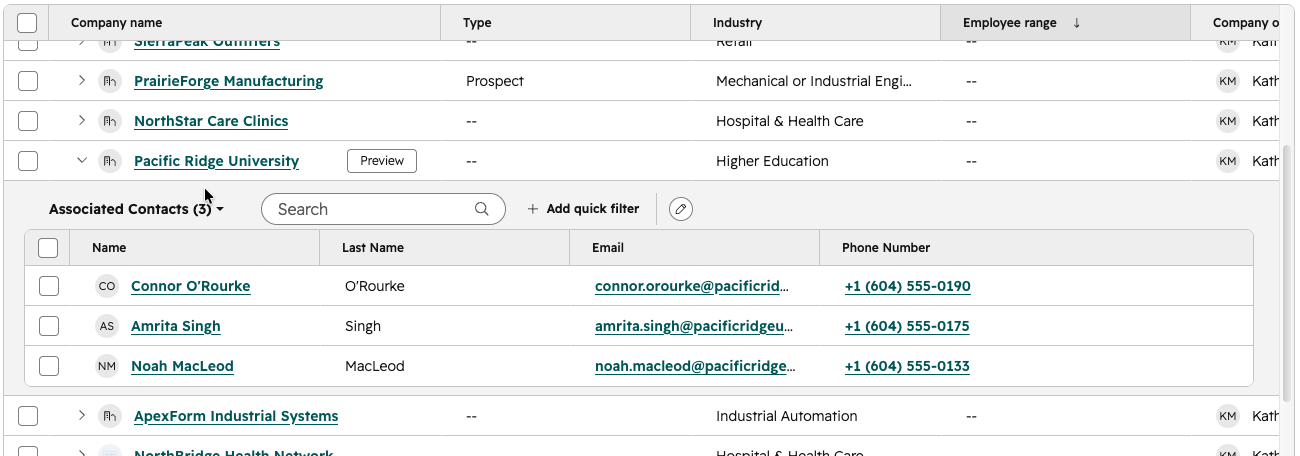
The inline association table lets you see and act on associated record data directly from any CRM index page.
Why does it matter?
Right now, you can't answer key questions about your business from the index page — like, "Which contacts have an associated deal closing next month?" Getting that answer requires clicking into individual records or cobbling together workarounds, which is slow and frustrating.
The inline association table brings cross-object context to where you already work, so you spend less time navigating and more time acting.
How does it work?
On any CRM index page, click the caret next to a record to expand the inline association table. From there:
- Select the associated object type you want to view.
- Use search and filtering to narrow down records.
- Customize your columns and use bulk actions to update records without leaving the page.
- Click save to save your column selection, sort, and filters to the view.
Note: default views do not support saving at this time.
Last Chance to Save Your Spot
Our webinar is happening this week, and there's still time to register. If you're wondering how to improve your brand's visibility in ChatGPT, Gemini, Perplexity, and other AI search experiences, this session will give you practical strategies you can start using right away.
Register for Earn the Answer: PR + AEO Tactics That Get You Found in AI Search, to learn how PR and Answer Engine Optimization work together to help B2B brands get discovered, cited, and trusted by AI.
