 Orange Marketing
%20(16).png)
Complex B2B deals don’t involve just one contact, and successful email campaigns shouldn’t be left to chance. This week’s HubSpot updates give you more visibility into the stakeholders behind every deal and more control over how your marketing emails are delivered.
With Buying Groups, you can map and manage every key decision-maker involved in a sale or renewal. And with Email Throttling, you can control send rates to protect deliverability and avoid overwhelming your systems.
Let's take a look at the updates we found most interesting for the week of February 23, 2026.
- Buying Groups, and
- Throttle Marketing Email.
Buying Groups
HubSpot is excited to announce the launch of Buying Groups, HubSpot’s new native version of OrgChartHub, which joined the HubSpot family in June — now available in Sales Hub and Service Hub Professional.
Buying Groups bring powerful context right into HubSpot, making it easier than ever for your team to understand and influence every decision-maker involved in a sale or renewal.
The Buying Group functionality allows Sales and Customer Success teams to get a clear visual of the key stakeholders they are prospecting, selling to and working with.
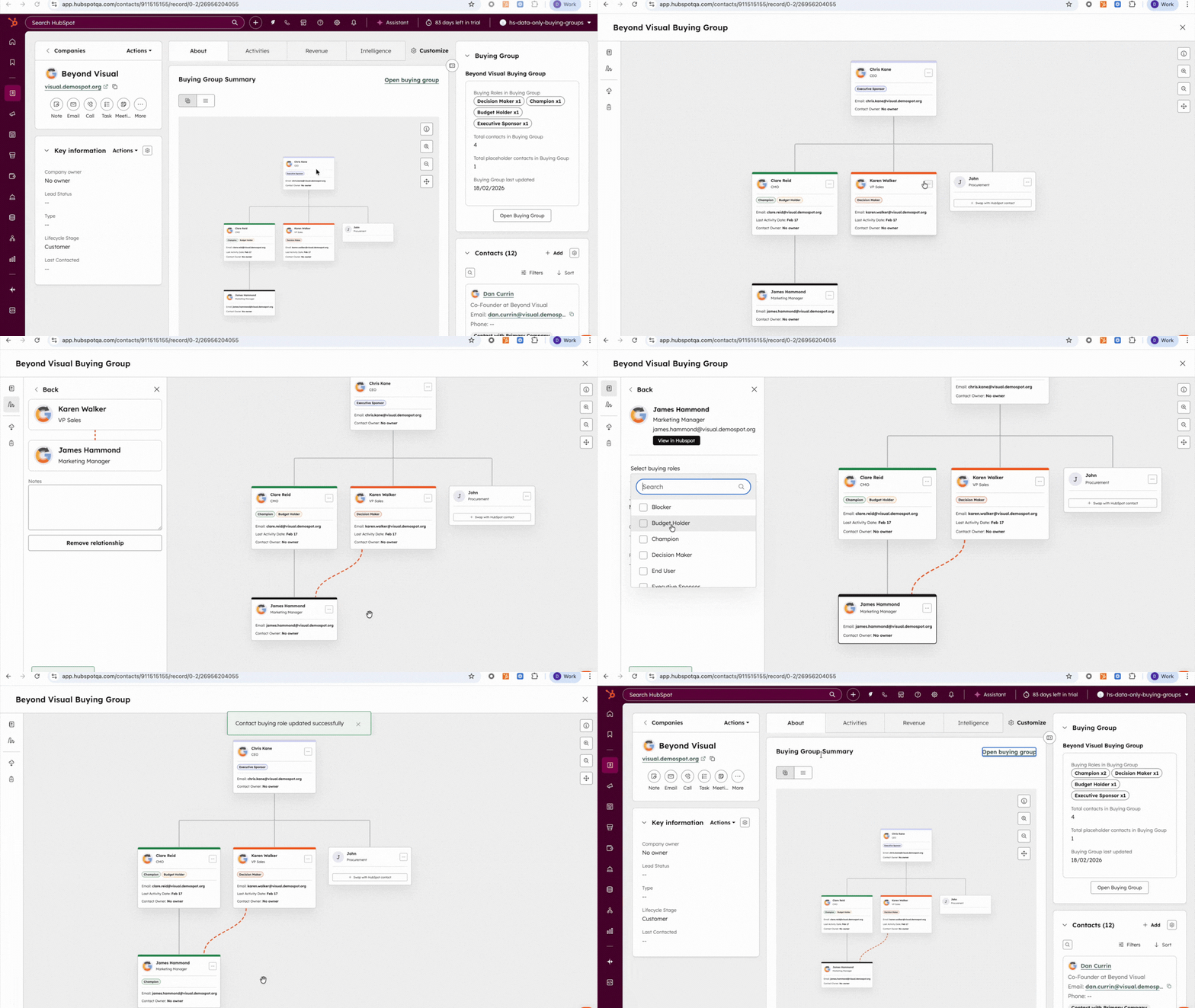
Short loom video here, showing how to input the Buying Group Cards.
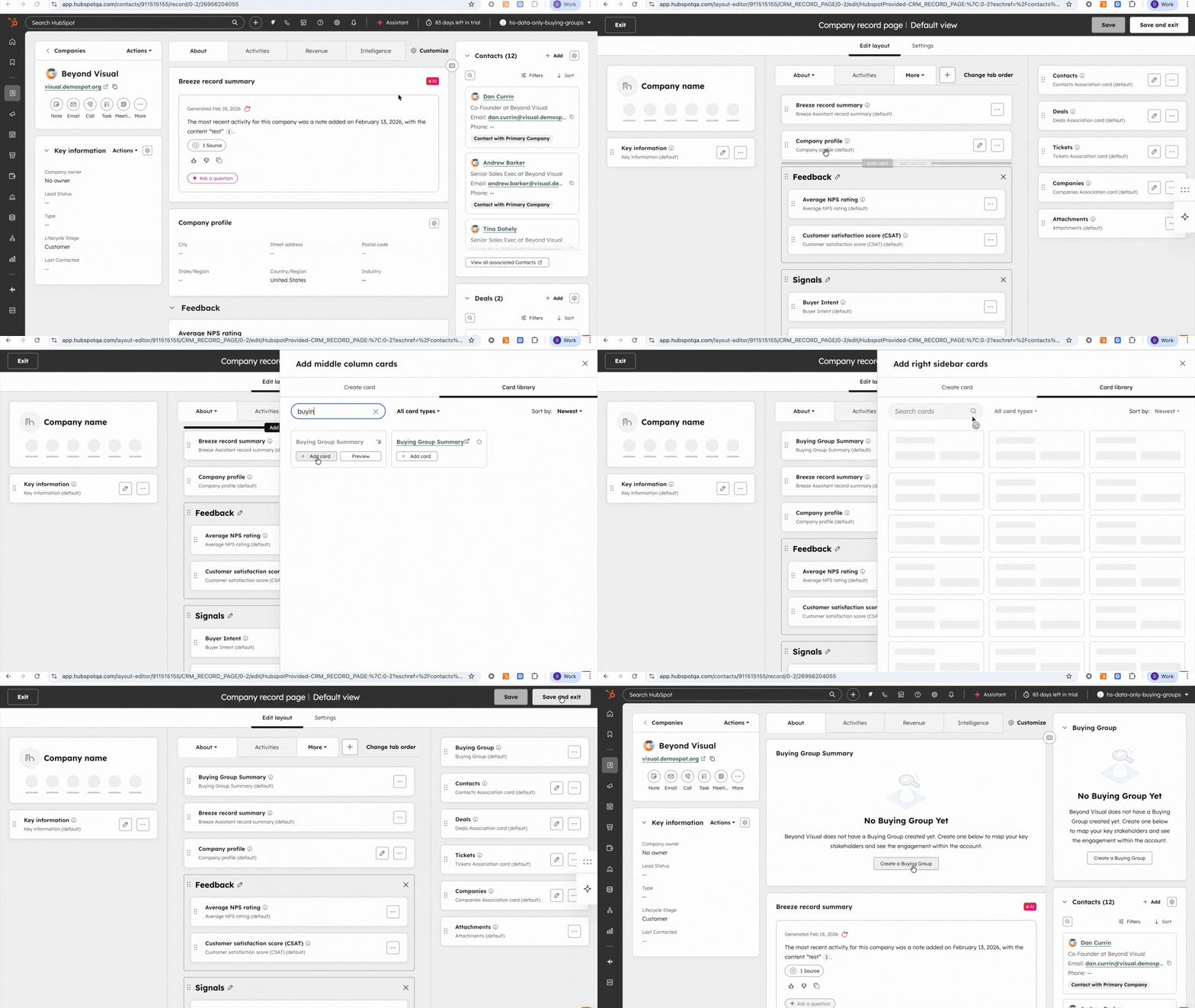
Buying Group
When you’re selling to or managing large accounts, you’re not just engaging one person, you’re working with a big, complex buying group.
That’s why top HubSpot customers map out the buying group and each buyer’s role from prospecting, to close, to renewal. It helps them:
- See the whole picture: Who’s in the group, who’s calling the shots, and who’s influencing from the sidelines.
- Spot the gaps: Identify missing connections or weak relationships before they become roadblocks.
- Protect the deal and renewal: Keep everyone engaged and aligned to reduce the risk of a last-minute derail.
How does it work?
Buying Groups can be accessed from within the HubSpot Company profile, short loom demo here showing the full functionality.
Throttle Marketing Email
Customers can set a custom email send rate for campaigns to control how quickly messages are delivered.
Lowering your send rate can help protect your systems and teams by spreading activity over time and reducing the risk of traffic spikes to your website or support channels. It can also strengthen deliverability by creating a more consistent sending pattern that builds trust with receiving servers, which is especially valuable for re-engagement campaigns.
How does it work?
When scheduling your marketing email campaigns:
- Expand Advanced Settings
- Select Send more slowly (throttling)
- Enter desired sending rate
Our system will send your email campaign no faster than the specified rate. If throttling is not enabled, our system will send as fast as possible.
Ready to Level Up Your 2026 Strategy?
As Buying Groups reshape how we think about complex deals and smarter email delivery becomes critical for performance, one thing is clear: B2B marketing in 2026 demands a more strategic, data-driven approach.
If you want to stay ahead of buyer behavior, evolving tech, and the growing role of AI in marketing, don’t miss our latest resource.
Download our guide, B2B Marketing in 2026: Focus, Investment, and AI, and get the insights you need to plan smarter, sell better, and grow faster.
