 Orange Marketing
-1.png)
It’s hard to believe we’ve made it to the final HubSpot update of 2025, but here we are, holiday coffee in hand, tying a bow on a year packed with powerful CRM enhancements. While this week’s release is a bit lighter (the HubSpot product team deserves some cocoa too), it still brings meaningful features for teams looking to clean up data, streamline outreach, and connect AI tools even more deeply into their workflow.
Before you sign off for some well-earned rest, check out these updates for the week of December 22, 2025. Your 2026 self will thank you.
- Enrichment Property Mapping and Overwrite Controls,
- New Email Property: Sequence ID, and
- Take Action with Claude: Update CRM Records and [Live] Access Engagement History.
Enrichment Property Mapping and Overwrite Controls
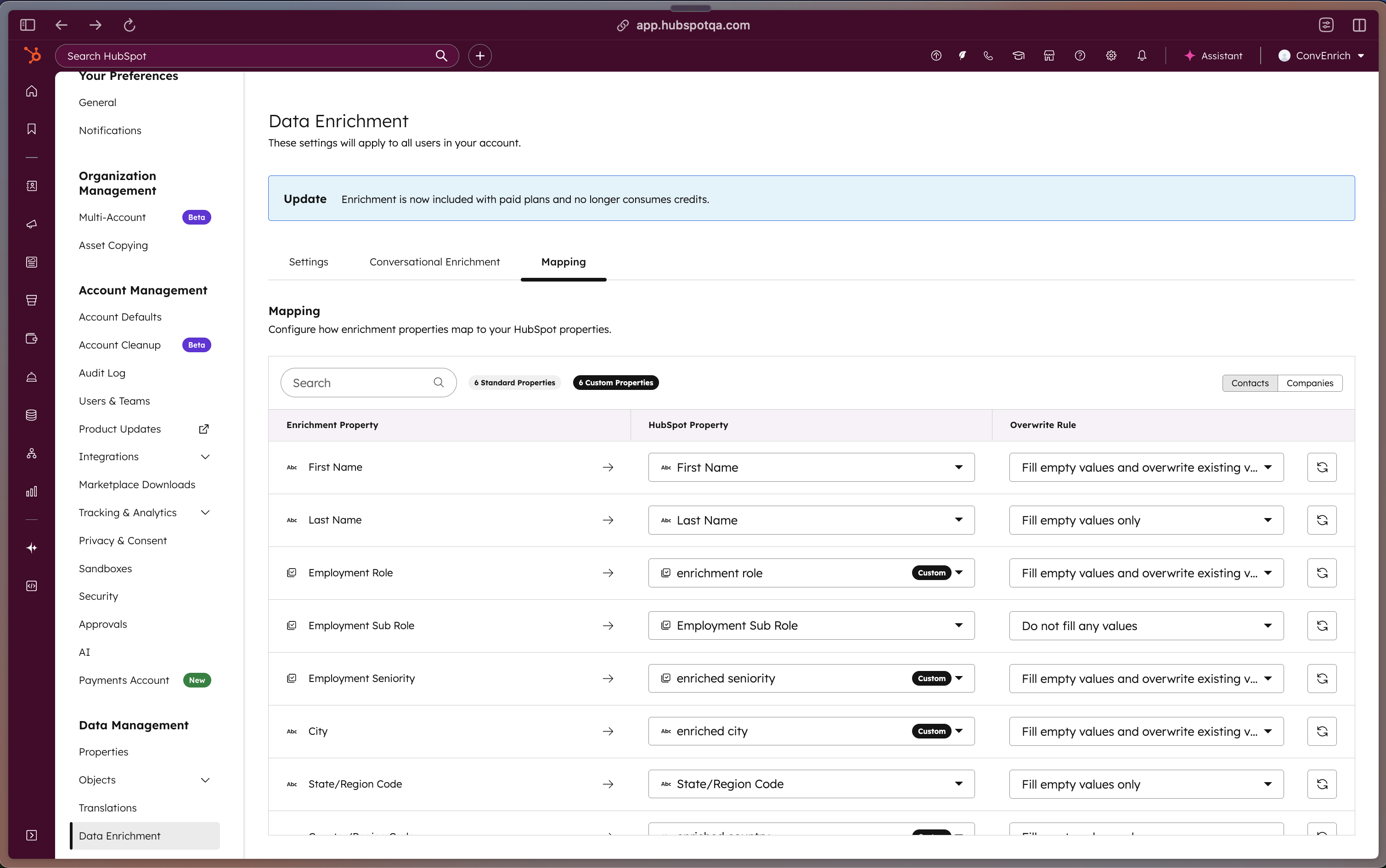
You can now map data enrichment fields to custom properties and set property-level override rules.
Customers need flexibility to direct enrichment data to custom fields, avoid unwanted overwrites, and integrate multiple data providers without conflicts. This addresses data governance requirements, prevents data loss from collisions, and more precisely controls overwrite logic at the property level for companies and contacts.
How does it work?
- Navigate to Settings > Data Enrichment > Mapping
- To modify default field mappings for each object:
- Select target custom properties for each enrichment field using drop-downs
- Set per-property override rule:
- Fill empty values
- Fill empty values and overwrite existing values
- Do not fill any values
- This will automatically save and future enrichments will follow these rules
New Email Property: Sequence ID
A new email property that identifies whether a one-to-one email was sent as part of a sequence and captures the specific Sequence ID.
You can now filter and report on emails based on their association with sequences. This enables you to:
- Segment email performance by sequence versus non-sequence emails
- Build reports that isolate sequence-driven email activity
- Analyze email engagement patterns within your sequences
How does it work?
The Sequence ID property has been automatically added to all email objects. The property displays:
- The name of the Sequence if the email was sent as part of a sequence
- A null value if the email was not part of a sequence
All historical email data has been backfilled with these values. You can access this property in:
- The Emails index page for filtering
- Report builders for segmentation and analysis
Take Action with Claude: Update CRM Records and [Live] Access Engagement History
(In Public Beta)
The HubSpot connector for Claude can now create and update CRM records and log activities (engagements) directly from Claude’s chat window – including new contact and deal creation, and logging notes or tasks.
(Live in GA)
Claude can also generate on powerful insights based on your complete engagement history (emails, calls, meetings, tasks, and notes).
Please note:
- If your HubSpot account has sensitive data enabled, the HubSpot connector for Claude will not have access to any engagement data for added security.
- When using create and update actions in the HubSpot connector for Claude, attribution will be recorded in your HubSpot account’s Audit Log to the user and the Claude connector.
- HubSpot connector for Claude cannot delete records or engagements in your CRM.
- The HubSpot connector for Claude supports bulk Create and Update actions for a maximum of 10 records in a single request.
Why Does It Matter?
With expanded write access and engagement visibility, the HubSpot connector for Claude allows you to update your HubSpot context directly without leaving Claude. Ask Claude to log a discovery call, create follow-up tasks, update deal stages, or analyze months of customer emails using natural language.
By accessing engagement history such as emails, tasks, and notes, Claude can surface meaningful insights and let you take action on them instantly, right from the chat window. This unlocks faster, more intelligent use cases, like:
- Faster workflows: Create a task to follow up with a prospect who had questions on pricing.
- Smarter insights: Claude can now access your email threads and call notes to provide context-aware recommendations.
- Less manual work: No more copying insights from Claude into HubSpot properties manually – update directly from Claude’s chat window.
- Better decisions: Analyze real customer conversations, not just CRM snapshots.
How Does It Work?
To access write access and engagement visibility in the HubSpot connector for Claude, you’ll need to disconnect and reauthenticate your HubSpot account.
Example prompts
Updating CRM context (write access): The HubSpot connector for Claude can update your CRM directly.
- “Create a new contact for [X] at with their email [insert email address]”
- “Update the deal ‘Enterprise Package Q4’ to Closed Won.”
- “Log a note on this ticket summarizing our resolution approach.”
- “Create a task for me to follow up with [X] next Tuesday about contract renewal.”
Engagement visibility: The HubSpot connector for Claude can now access your communication history to provide richer context.
- Sales: “Summarize all my emails with [X] from the last month and list any issues that might affect deal closure.”
- Marketing: “Create Follow-Up Tasks from Recent Email Opens”
- Service: “Show me all open tasks assigned to me this week, sorted by priority.”
For more prompts, please visit our prompt library.
Additional Best Practices
- Start small by updating a single record before making bulk changes.
- Always review the proposed changes that Claude shows before execution and take a moment to confirm them.
- For the best results, use the latest models and turn on “Extended Thinking” mode.
Please note: A Super Admin or a user with App Marketplace permissions in your HubSpot account must connect the connector for the first time or, if already installed, uninstall and re-connect and select the allowed / updated permissions for it. Once this is done, they can give access to other users to connect it. Learn more about how you can manage access to the connector.
The HubSpot connector for Claude respects user permissions, users will only see the CRM context they’re allowed to access in HubSpot. For example, individual sales reps will only see pipeline data for deals they have permission to view or update.
The HubSpot connector for Claude responds in the language used by the user, if supported. For the full list of supported languages, please refer to Anthropic’s multilingual documentation & supported countries and regions.
Take your HubSpot Further in 2026
From toll-free number support to more flexible CRM views and integrations, this week’s updates reflect a clear trend: giving teams the tools they need to move faster, stay organized, and scale smarter. But it’s not just about features, it’s about what you do with them. If you’re thinking about consolidating systems or upgrading your CRM strategy, see what it looks like in action.
Let us help you build revenue and support systems that actually work!
