Orange Marketing
%20(5)-1.png)
As the year winds down, HubSpot is still delivering solid improvements focused on usability, automation, and data clarity. This week’s updates are especially helpful for ops teams and anyone managing CRM views or integrations. From toll-free number support to more flexible CRM tables, and even smarter deduplication and Zapier automation, these changes help clean up workflows and reduce friction across your systems.
Here are our favorite HubSpot updates for the week of December 8, 2025:
- Toll Free Numbers (U.S.),
- Flexible CRM Views,
- Refine Suggestions for DeDupe, and
- Zapier: More CRM Objects Support.
Toll Free Numbers (U.S.)
Toll Free numbers are valuable business branded lines that provide low cost options for customers and prospects to contact a business.
How does it work?
Follow the steps to "Get a HubSpot" number.
- In your HubSpot account, click the settings settings icon in the top navigation bar.
- In the left sidebar menu, navigate to Calling > Call Setup.
- On the Phone numbers tab, click Get a HubSpot number.
- In the right panel, review the information, then click Next.
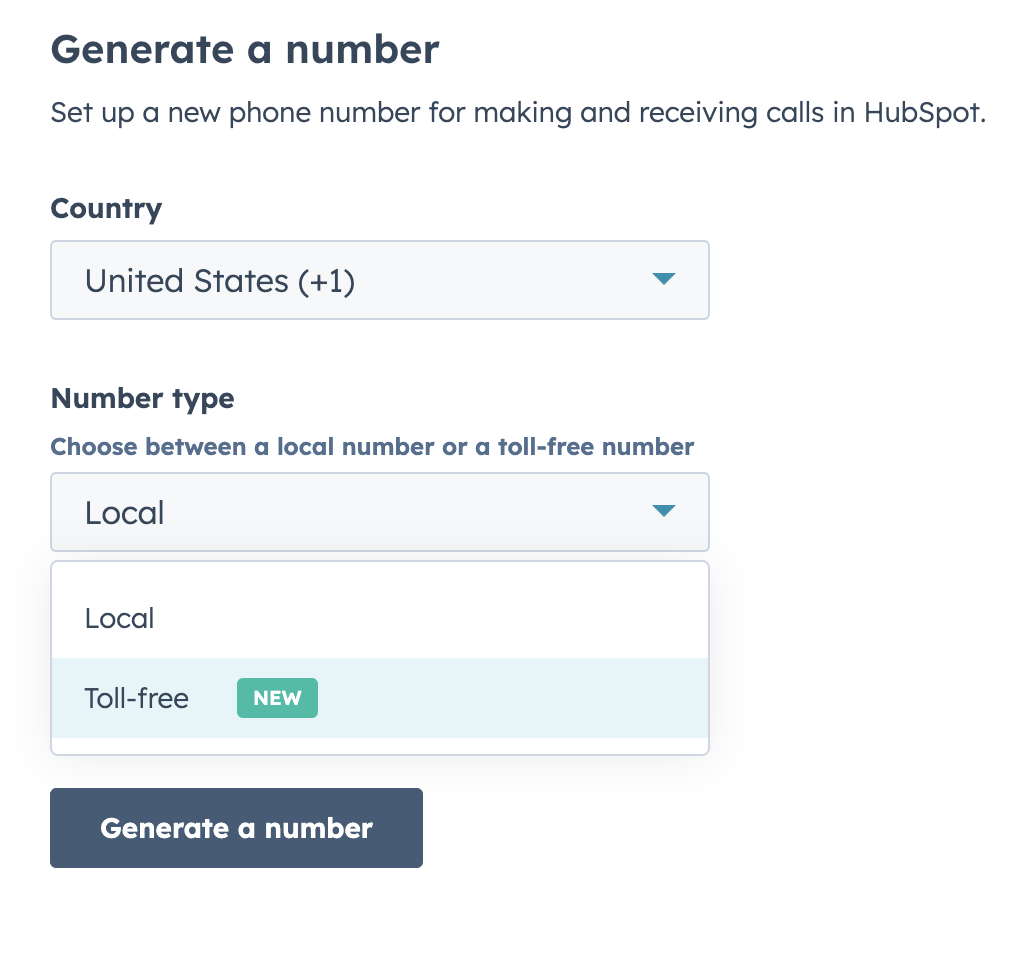
- Use the dropdown menu to select United States.
- Select "Toll Free" under number type. - Click Continue to set up.
The acquisition of each US Toll Free number will use one of your allotted HubSpot-provided phone numbers. Calling minute usage remains the same (from your portal total), there are no additional charges for toll free calls.
Flexible CRM Views
What is it?
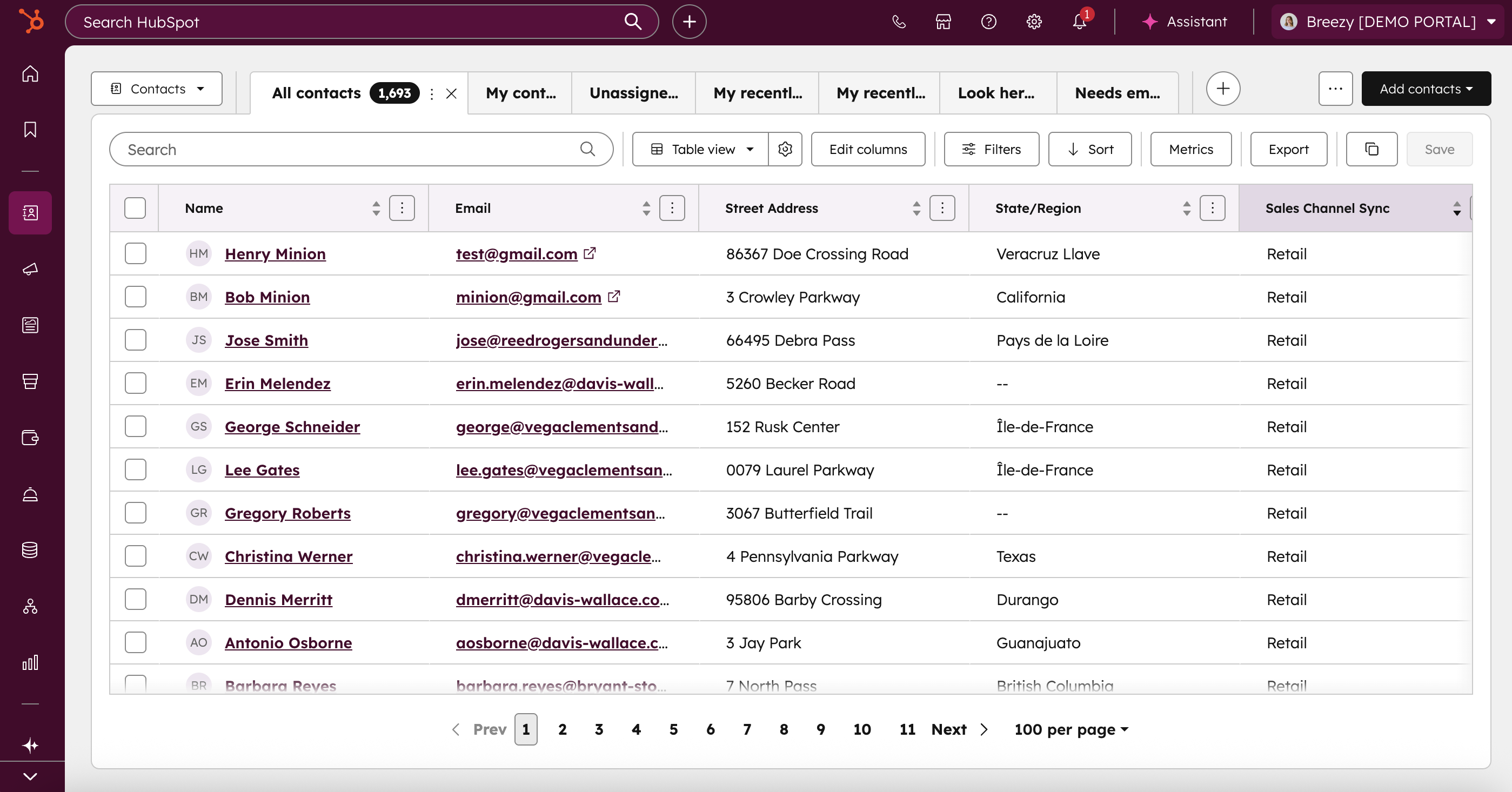
The redesigned CRM Index pages put your data front and center, so you can focus on what matters most. With new view types like Calendar, Gantt, Report, and more, you can now visualize your data in ways that match your workflow. Whether you're renaming views on the fly, spotting trends with conditional highlights, or diving deep into column-level insights, everything is built to help you see more, click less, and act with confidence.
How does it work?
All CRM Index pages now offer a more streamlined and insightful experience making it even easier for you to work with your data. Here's what's new:
Smarter Data Insights
- Column Insights: Instantly summarize your data with AI-powered analysis right from the index column.
- CRM Metrics: Surface the most relevant metrics on your Company, Contact, and Ticket index pages with fully customizable data wells.
New Ways to Visualize
- Report View: Analyze CRM data directly within index pages using integrated reporting tools.
- Calendar View: See your records laid out in a real-time calendar.
- Gantt Chart View: Track timelines of records and associated tasks.
- Custom Board View: Group records by any field—like owner or priority—to fit your workflow.
Clean Design, Better Control
- Decluttered Display: A refreshed, minimalist interface keeps your focus on the data.
- Visual Signals: Use conditional highlighting to spot trends and issues at a glance.
- Enhanced View Management: Rename, clone, or delete views directly in-tab for faster organization.
Updates To Flexible CRM Views as of October 7, 2025
New table display settings provide a single place to configure how CRM tables look and behave, with quick adjustments for data density, pagination, and visual styling.
In the table toolbar, click the gear icon to open the display settings panel. From there, you can adjust the following options:
- Data density: Choose Default, Compact, or Comfortable views to control row spacing.
- Visual customization: Select pagination style and enable zebra striping to improve table readability.
Your settings apply immediately and persist for your user account.
Updates To Flexible CRM Views as of November 4, 2025
HubSpot has rolled out several updates to make the Index page more flexible and personalized:
- Calendar view, now available across more objects: You can now use the Calendar visualization on more standard and custom objects—giving you greater control over how you view and plan your data.
- Streamlined tabs for better navigation: HubSpot refined the tab design to be more compact and information-dense, so it's easier to scan, focus on view names, and see more tabs at once.
- Fully customizable quick filters: You can now create quick filters based on any property, remove default filters you don’t need, and reorder them to better match how you work. Click here to enroll in this release.
Refine Suggestions for DeDupe
What is it?
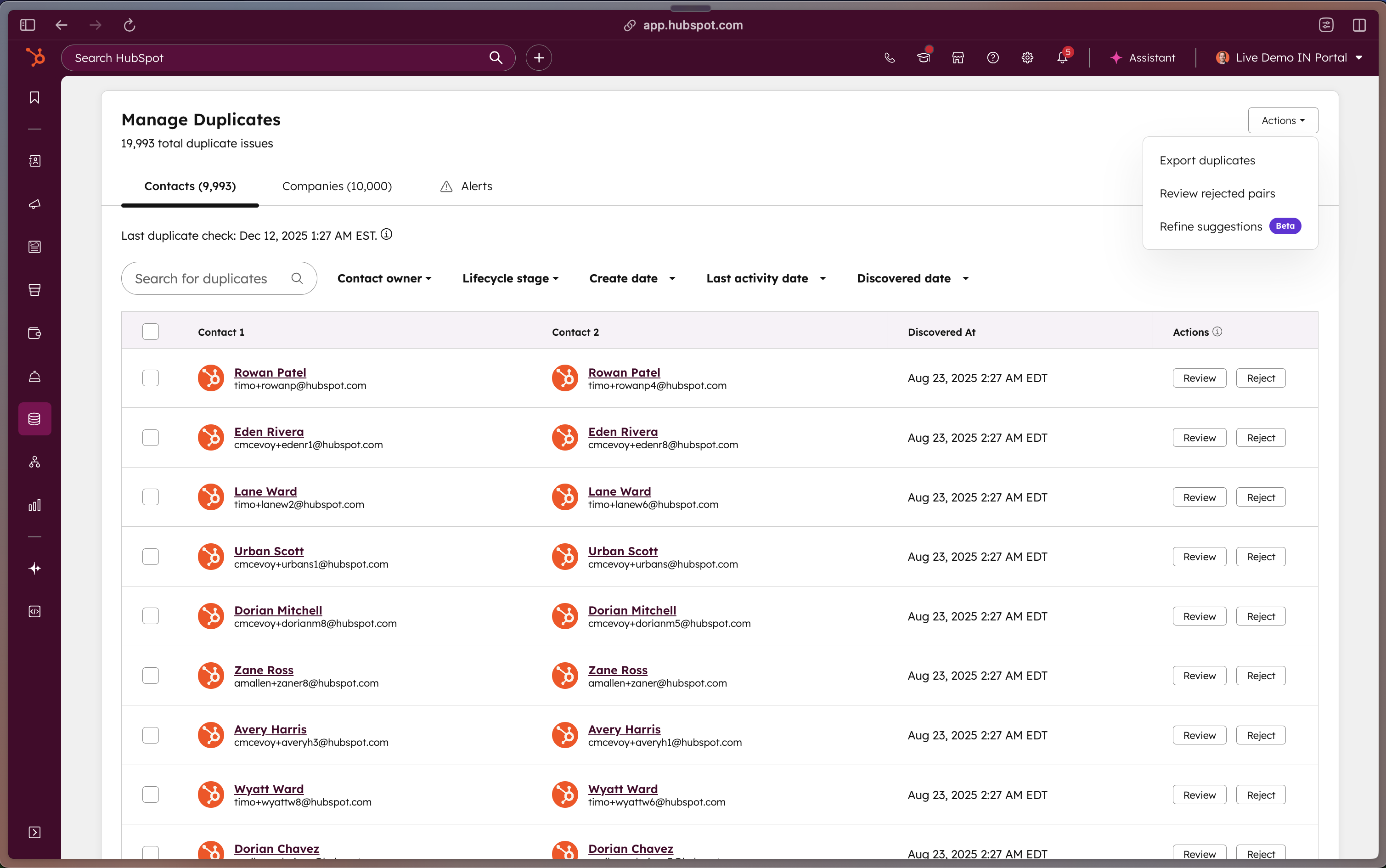
Customers can now reject multiple duplicate suggestions in bulk using rules configured on top of the existing duplicate identification model.
User Need
Portals with many identified duplicates have no way to reject duplicate suggestions in bulk, making it harder to manage and clean up large volumes of duplicates.
Benefit
This reduces duplicate clutter, allows new duplicates to be identified, and can lower backend computational load by reducing the number of records to review.
How does it work?
- Navigate to the existing duplicate management interface where AI-identified duplicates are listed in a table.
- Select the 'Refine Suggestions' action from the dropdown.
- Configure rules for bulk rejection (rules are guided and not custom-defined).
- Invoke the bulk rejection to programmatically reject duplicates identified by the model.
Zapier: More CRM Objects Support
Following HubSpot's recent CRM Objects release, they have introduced more support to help you further automate your business. The Zapier app now supports the additional CRM objects listed below:
- Appointment
- Cart
- Commerce Payment
- Course
- Deal Registration
- Discount
- Fee
- Goal Target
- Invoice
- Lead
- Listing
- Postal Mail
- Project
- Service
- Subscription
- Tax
Why does it matter?
HubSpot has unlocked more ways to connect your tools, giving you greater flexibility to design workflows that truly match how your team works. You can now create smarter, more precise automations with the Zapier integration with more CRM objects available.
With this update, HubSpot has followed through on the groundwork to make unlocking additional CRM objects faster. As HubSpot continues to add more functionality, this work will significantly reduce the time users must wait between feature launch and automation enablement via Zapier.
How does it work?
You can find and interact with these new objects when using actions in Zapier like Create, Delete, Get, and Update:
- Create CRM Object
- Delete CRM Object
- Get CRM Object (by ID)
- Update CRM Object
- Search | Find CRM Object
These objects are also accessible via the CRM Object Recently Created and CRM Object Recently Updated triggers.
Bringing It All Together with HubSpot
From toll-free number support to more flexible CRM views and integrations, this week’s updates reflect a clear trend: giving teams the tools they need to move faster, stay organized, and scale smarter. But it’s not just about features, it’s about what you do with them. If you’re thinking about consolidating systems or upgrading your CRM strategy, see what it looks like in action.
Read more about how a logistics and transport company unified four lines of business by switching from Microsoft Dynamics to HubSpot.