Orange Marketing
This week's HubSpot updates focus on cutting down manual work across sales and operations. A reimagined Prospecting Agent now identifies in market companies and sources contacts automatically, a new beta lets users be fully functional members of multiple teams, and a Data Model Health check helps admins catch messy properties, pipelines, and objects before they become bigger problems. Here's a closer look at each update and why it matters.
Here are the most notable updates for the week of August 3, 2026:
- Prospecting Agents Get Smarter,
- Support Multiple Main Teams for Full Functionality, and
- Data Model Health.
Prospecting Agents Get Smarter
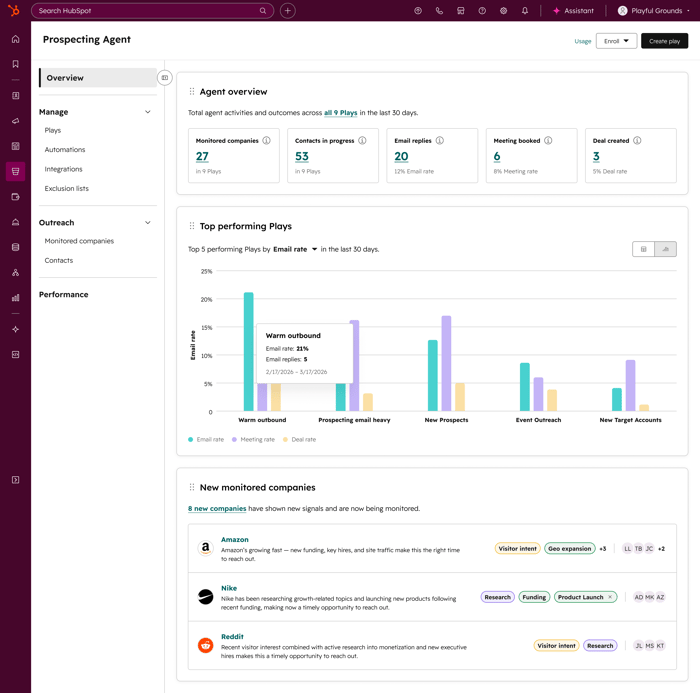
Prospecting Agent has evolved to become an end-to-end outbound agent, enabling sales organizations to automatically identify in-market companies based on real-world triggers and instantly source the right contacts via 3rd party integrations.
With this update, Prospecting Agent can:
- Detect companies that match key buying signals (like growth, hiring, funding, or intent)
- Automatically identify and source relevant contacts at those companies from within the CRM or through 3rd party integrations
- Generate and enroll contacts in personalized email outreach and calling tasks
Why does it matter?
Sales reps currently spend significant time manually building account lists, finding contacts, and researching companies before they even begin outreach. This manual process lacks intent and often leads to engagement with prospects when the timing isn’t right or produces generic outreach that doesn't resonate.
Prospecting Agent addresses this by automatically identifying companies showing buying signals, sourcing contacts, and generating personalized outreach, so reps can engage buyers at the right time without any manual research.
How does it work?
Admins create Plays, which define how the Agent researches, sources, and engages:
- Prospecting Agent monitors selected companies for signals (e.g. growth, hiring, funding, intent)
- A triggered signal prompts the agent to identify relevant companies
- The agent recommends contacts sourced from third-party providers
- The agent drafts multichannel outreach for the sourced contact
- The rep approves to the contact or outreach is automatically approved
It all runs continuously in the background, no manual list building, no refreshing. Just the agent working toward your predefined goal, like a booked meeting.
Limitations:
- Supported signals are limited to a predefined set and may not cover all buying indicators
- Prospecting Agent may not find contacts for every triggered company
- Contact sourcing requires a connected third-party provider (see below)
- Coverage and data quality vary by provider and your contract with them
Third-party contact sourcing:
The Prospecting Agent integrates with 3rd party sales intelligence providers to help source contact data. To source contacts, you must connect via Oauth at least one supported provider inside the Prospecting Agent app:
- ZoomInfo
- Apollo
- Surfe (API key support only)
Prospecting Agent does not include contact data by default. All enrichment, usage limits, and compliance are governed by your existing agreement with each provider.
Support Multiple Teams for Full Functionality
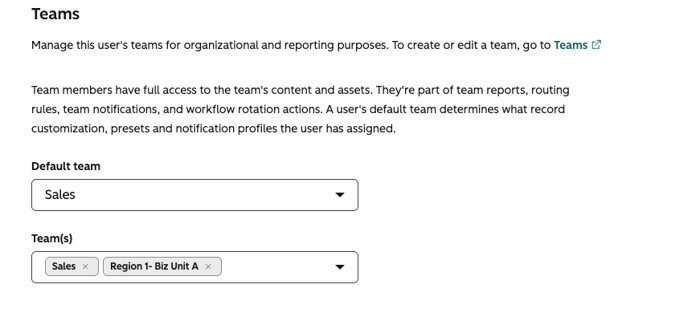
Users can now be fully functional members of multiple teams in HubSpot, with equal access to routing and workflows across all assigned teams.
Why does it matter?
Previously, users assigned to more than one team could only be full members of a single 'main' team, leading to reduced capabilities and workflow friction for those working across regions or functions.
The idea “Allow users to be ‘primary team members’ of more than one team” has collected 200+ upvotes, including 70+ replies and numerous comments over multiple years. This change removes artificial limitations, improving collaboration, and ticket coverage for organizations with flexible or matrixed team structures.
This update also ensures predictable and transparent routing behavior. Previously, many customers did not realize that “extra” team members were excluded from assignment pools, leading to confusion or inequitable workload distribution. By making all team members fully functional, teams can now rely on routing rules and workflow logic behaving consistently.
How does it work?
The team model is now simplified with just two fields:
Teams
A user can belong to multiple teams, all of which offer full functionality — access to records, inclusion in reports, eligibility in routing rules, and participation in workflow rotation.
When a team is used in routing rules - such as workflows' Rotate Owner or Help desk ticket assignment - every seated user on that team will now be eligible for assignment, not just seated main team members.
Because the beta eliminates the “main” vs. “extra” distinction:
- If a team is referenced in a routing rule, all members of that team will begin receiving the assigned work.
- Customers should review their team memberships to make sure assignment behavior matches expectations.
Default Team
A single team that determines record customization views and preset preferences like notification profiles and the default home page.
When customers enroll in the beta:
- Existing teams listed as “extra teams” are automatically added to the new Teams field.
- The prior “primary team” becomes the user’s Default Team.
- All functional differences between “main” and “extra” teams are removed.
This makes it significantly easier to manage users who work across regions, queues, or functional groups.
Please Note:
- In Team based workflows, there is now a checkbox selection to only reference `Default` team members, which maintains the current state of workflows prior to this beta. This checkbox is selected by default.
- A new teams property `Owning Teams` is available for use in filters, reporting etc, which will show all teams a user is part of.
Data Model Health
A new health check within the data model overview that scans your account's properties, objects, associations, pipelines, and lifecycle stages, then surfaces issues with recommended actions you can take directly from the page.
Why does it matter?
Over time, CRM data models accumulate unused properties, abandoned objects, and misconfigured pipelines, making it harder for your team to find and use reliable data effectively. When these issues go unnoticed, they become real go-to-market problems.
The health check gives you a clear picture of what's working in your data model, what's not, and what to fix, so your model stays clean as your business grows.
How does it work?
You must be a Super Admin or Partner Admin to use this feature.
Running a health check:
- On the left navigation, click Data Management > Data Model > Health
- Navigate to the Health tab. On your first visit, the health check runs automatically. This takes a few minutes to complete.
- Once the scan is done, flagged issues appear with recommended next steps for each finding. Where available, you can take action directly from the page.
- To re-run the check after making fixes, click Run health check.
What it checks:
- Properties: Flags properties with low fill rates, inactive properties with no usage, potential duplicates with similar labels, and mismatches between fill rate and actual usage (e.g., high fill but low usage, or low fill in critical workflows)
- Objects: Identifies custom or toggleable objects with very few records or no associations, which may indicate abandoned or misconfigured objects
- Associations: Catches association types with low record counts that may not be serving their intended purpose
- Pipelines: Detects pipelines with unusual stage configurations, including those with 20 or more stages, missing closed stages, or stages with no records flowing through them
- Lifecycle stages: Surfaces lifecycle stages with zero records
Help Buyers Find You
Smarter prospecting, cleaner data, and better routing can improve what happens once buyers enter your HubSpot ecosystem. But AI is also changing how they discover and evaluate brands before they ever reach your CRM. Watch Earn the Answer: PR + AEO Tactics That Get You Found in AI Search to learn how PR credibility and practical AEO tactics can help your brand appear in the answers AI recommends.