 Orange Marketing
.png)
This week’s HubSpot updates are all about making everyday work a little smoother, and letting AI take on even more of the heavy lifting. From keeping automations running seamlessly when CRM records are merged to having Breeze build an entire PowerPoint deck for you, HubSpot continues to eliminate some of those small-but-time-consuming tasks that add up quickly.
Plus, new prompt-sharing capabilities make it easier for teams to turn their best AI workflows into repeatable processes everyone can use.
Here are our favorite updates for the week of August 24, 2026:
- Workflow Enrollments Preserve Main Object Record when Merging,
- Breeze Assistant can now Create Downloadable PowerPoint Decks, and
- Prompt Sharing in Breeze Assistant.
Workflow Enrollments Preserve Main Object Record when Merging
We're updating how workflows behave during a record merge. The record you keep will now stay enrolled in its active workflows, rather than being unenrolled alongside its duplicate.
Today, when you merge two records — say, two duplicate contacts — both records are unenrolled from any workflows they were active in at the time of the merge. That includes the record you chose to keep.
Soon, only the duplicate (the record being merged away) will be unenrolled. The record you keep will continue along in any workflows it's already enrolled in, with no interruption.
Merging duplicates is usually a cleanup task. You shouldn't have to choose between fixing your data and keeping your automation running. With this update, you can merge records without pulling your contacts, companies, or deals out of in-flight nurturing, onboarding, or other workflows.
How does it work?
No action is needed, as this change is going into effect automatically on your behalf.
Moving forward, when you merge two records in your CRM:
- You select which record to keep (the primary) and which to merge away, just like you do today.
- The primary record stays enrolled in any active workflows it was already running through. Its position in those workflows is preserved — delays, branches, and pending actions continue as if the merge never happened.
- The record being merged away is unenrolled from its workflows as part of the merge.
This applies across all CRM object types that support merging, including contacts, companies, deals, tickets, and custom objects.
Breeze Assistant Can Now Create Downloadable PowerPoint Decks
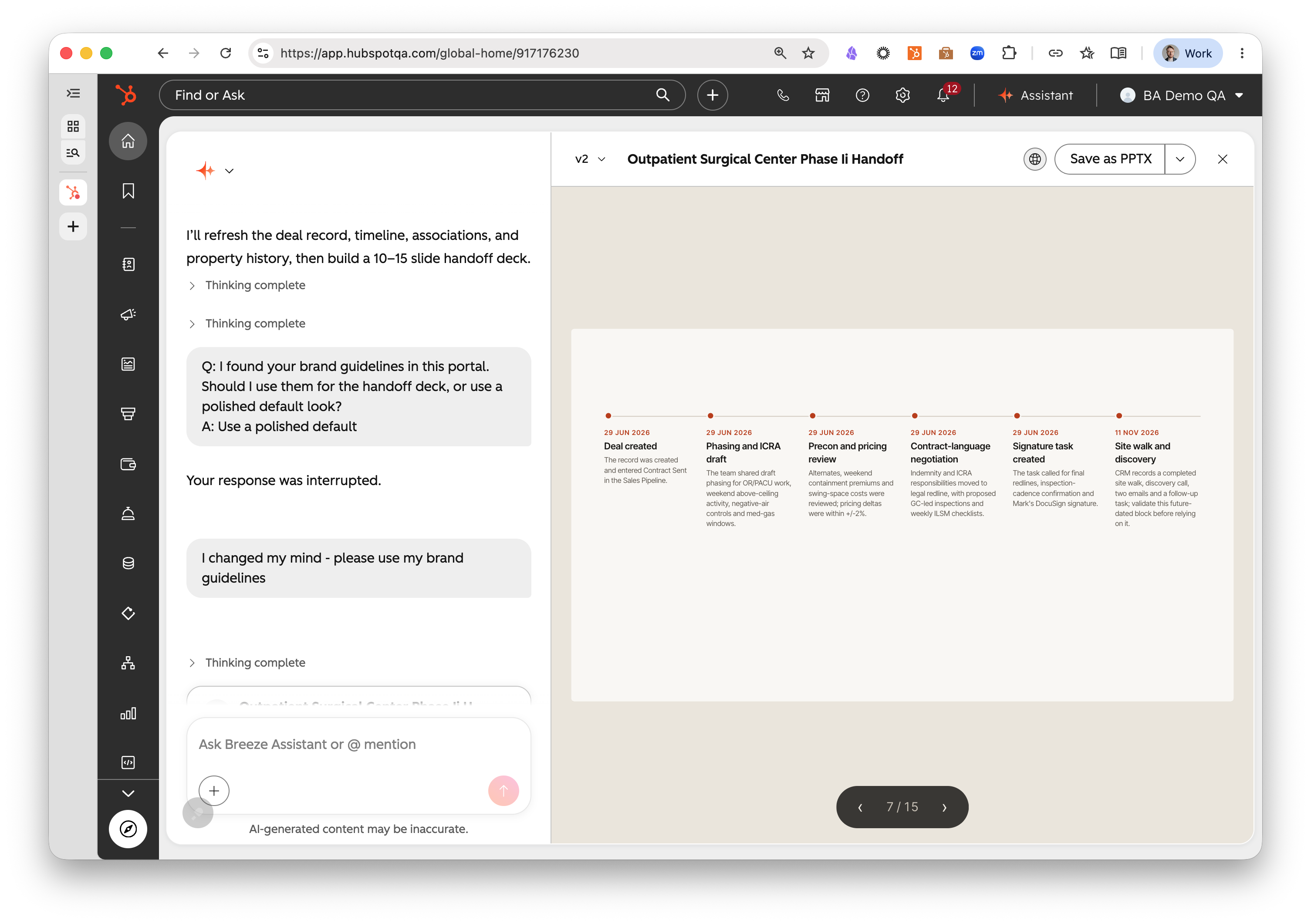
Breeze Assistant can generate a fully formatted, downloadable .pptx file when asked to produce a slide deck or presentation. Users can open the file directly in PowerPoint, Keynote, or Google Slides.
Customer-facing reps spend significant time copying information from their CRM into slide decks for prospect meetings, proposals, and business reviews. Breeze can now produce a downloadable .pptx directly — alongside HTML and Markdown — so reps get a ready-to-present deck without the manual copy-paste.
How does it work?
Ask Breeze to "create a slide deck" or "put this into a presentation." Breeze generates the slides and returns a downloadable .pptx file in the Canvas. The file is compatible with PowerPoint, Google Slides, and Keynote.
Slide layouts
- Breeze builds each deck from a library of ready-made slide layouts — title and section slides, agendas, comparisons, stat and "big number" slides, timelines and roadmaps, quotes and testimonials, and image-led layouts — choosing the right one for each piece of content and filling it with your CRM data, so decks come out clean and consistent.
Editing, downloading & sharing
- Edit: Simply ask Breeze to make any edits you need. If you want to specifically refer to one part of your presentation, select it in the Canvas first, and Breeze will understand that you want to edit that part.
- Download: Click Save as PPTX to download the deck and open it in PowerPoint, Keynote, or Google Slides.
- Share: Share a deck internally with everyone at your company or with specific teammates as a live, read-only view they can pick up and remix.
Prompt Sharing in Breeze Assistant
What's changed?
You can now share Prompts with more granularity. Previously, Prompts could only be shared with your whole portal. Now, when sharing a Prompt, you can choose individual Users or Teams to share the Prompt with.
Users can now share prompts with their entire portal, individual users or teams, making it easy for teams to collaborate on and reuse effective prompts across Breeze Assistant.
Teams can standardize workflows and share best practices. Instead of every user recreating the same prompts, one user can create and share a prompt that appears in everyone's prompt library.
How does it work?
For creating and sharing prompts:
- When creating or editing a prompt, look for the "Private / Only you have access" button.
- Click this to open the Sharing modal. Choose "Everyone" or select individual users or teams.
- Click Done and save your prompt—it will now be available to team members in their 'Shared Prompts' tab.
For accessing shared prompts:
- Click the Plus icon in the Breeze entry field
- Click Manage Prompts
- Click Shared prompts
- Find the Shared prompt you want to use, click the three dots menu, and click "Add to my prompts".
- Now it will appear in the Plus icon in the Breeze entry field.
Notes:
- Each shared prompt shows who created it (providing accountability and context)
- Users cannot modify shared prompts created by others; they can only use them as-is.
- Admins can delete any shared prompt if needed (for quality control or to remove inappropriate content)
Is Your Email Making It to the Inbox?
HubSpot can help you build smarter workflows and put AI to work across your marketing, but none of that matters much if your emails aren't reaching the people they're meant for.
This Thursday, August 27, Orange Marketing is sitting down with ZeroBounce for Inbox Denied: What’s Really Blocking Your B2B Email and How to Fix It, a live Q&A covering the deliverability issues that can keep even well-built email campaigns out of the inbox. Register for the live session.
