Orange Marketing
%20(24).png)
HubSpot is continuing to expand how teams collaborate, automate, and safeguard their data. This week’s updates focus on bringing more visibility into shared work with customers, unlocking deeper campaign automation, and giving you peace of mind when it comes to managing changes in your CRM.
From assigning tasks directly to customers to triggering workflows based on campaign activity, and even restoring recent data changes with ease, these enhancements are designed to help your team stay in control while moving faster.
Here are our top updates for the week of April 6, 2026.
- Assigning Tasks to Customers,
- Make Campaigns Automatable in Workflows, and
- Restore CRM Properties and Records.
Assigning Tasks to Customers
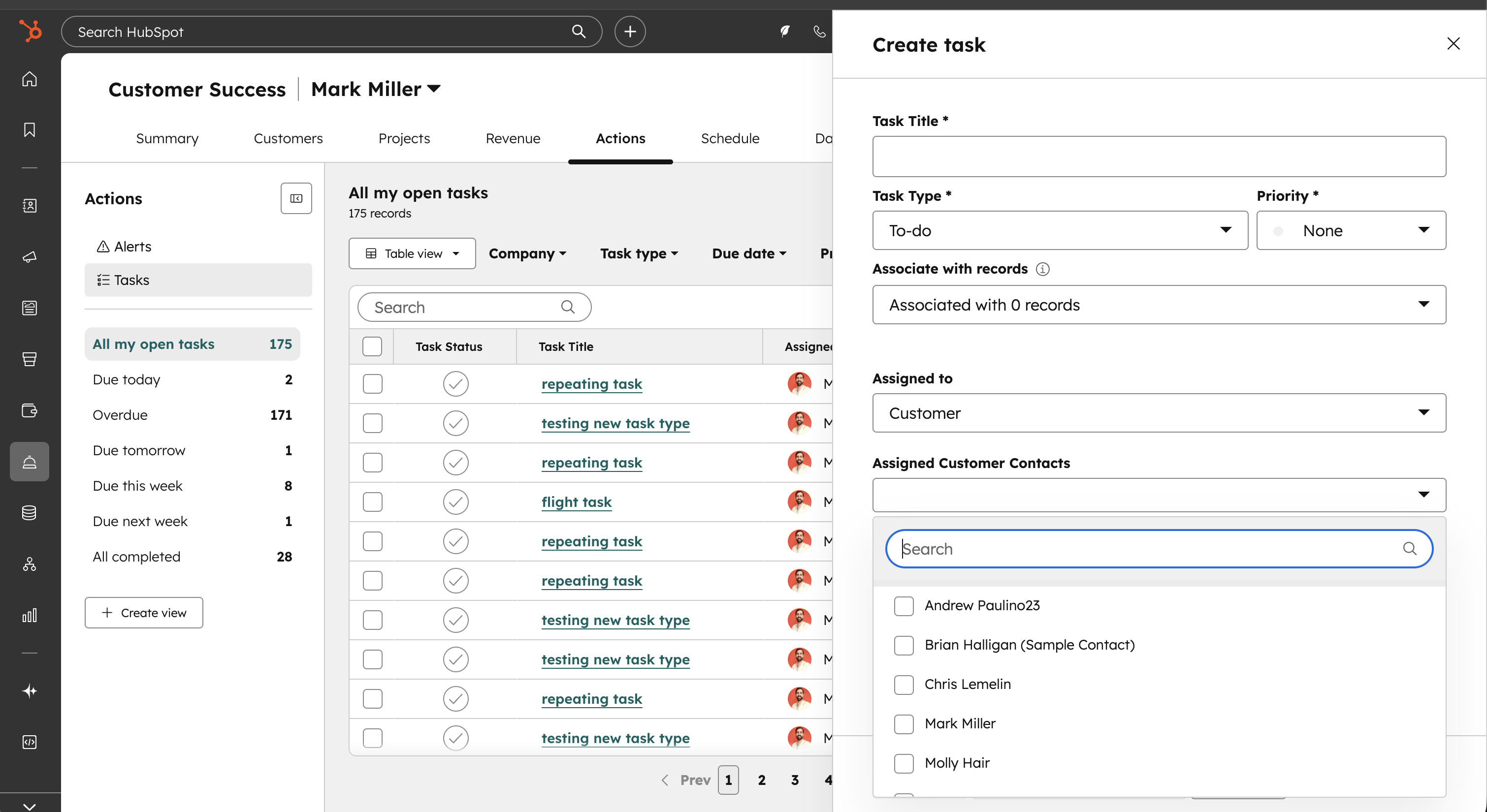
You can now assign tasks to your customers and specify which contact at their company is responsible for completing the task.
Service delivery often requires work from both your team and your customer's team. Until now, you could only use tasks to track work for your own employees. Now you can assign tasks directly to your customers and track work they need to complete, giving you a complete view of the service delivery process in one place. This sets the foundation for future updates where your customers will be able to access and manage these tasks themselves.
How does it work?
Creating customer tasks
When creating a task, you can now select Customer as a value in the Assigned To property. You can then specify which contact or contacts at your customer's company are responsible for the task using the new Assigned Customer Contacts property.
Permissions
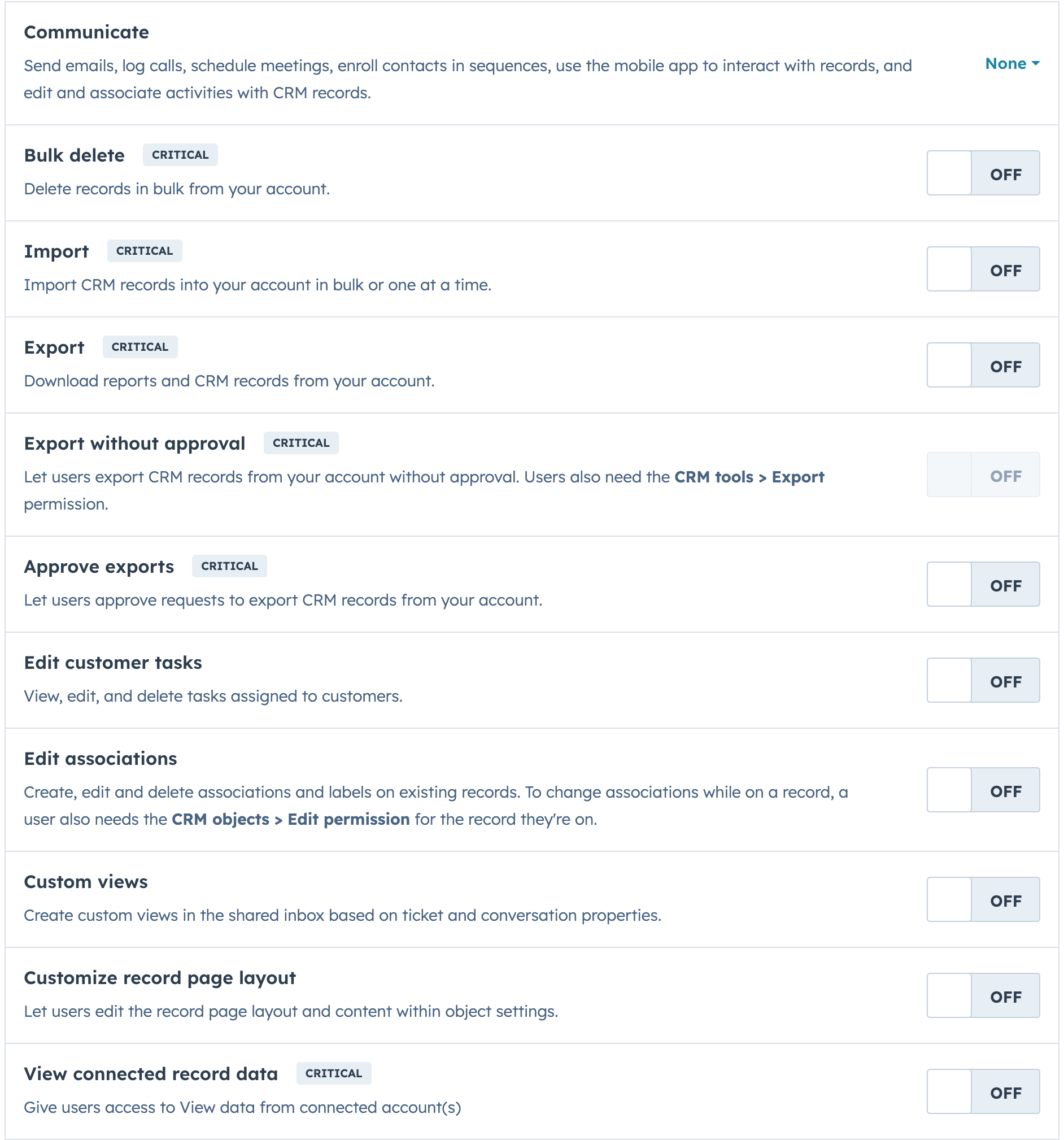
To view, edit, and delete tasks assigned to customers, you need the Edit customer tasks permission.
Make Campaigns Automatable in Workflows
You now have access to campaign properties and events in workflows.
With this update, you can automate based on campaign-level data (like budget, spend, revenue, or owner) and react when contacts are influenced by specific campaigns.
Why does it matter?
Until now, Campaign automation was limited. You couldn’t trigger workflows when a campaign overspent or follow up automatically with influenced contacts. This resulted in manual monitoring and missed opportunities to optimize or scale.
With this release, you can:
- Trigger alerts when a campaign overspends its budget.
- Automatically follow up with influenced contacts via tailored sequences.
- Route tasks and updates based on campaign owner or team.
- Use Breeze Assistant to create a campaign-based workflow
How does it work?
New Campaign Workflow Triggers & Actions:
- Use campaign properties (e.g., budget, spend, revenue, owner, team, start date, end date) in enrollment criteria.
- Build workflows that notify, assign tasks, or update campaign statuses.
Influenced Contact Trigger:
- A new event fires when a contact is influenced by a campaign.
Restore CRM Properties and Records
Seamlessly Restore CRM Data automatically captures the last 20 versions of your CRM data (45 for contacts), so that you can undo any changes in the last 14 days.
You need to protect your data integrity and quickly fix mistakes. Without this feature, reverting unwanted changes is time-consuming and requires property history exports and imports.
Now you can:
- Quickly identify and restore recent property changes
- Maintain data accuracy without leaving HubSpot
- Reduce downtime and improve efficiency in managing your CRM data
How does it work?
Two entry points as a super admin:
- Settings > Data Management > Backup and Restore OR CRM > Actions > Restore Property Edits
- Filter by source, property type, and date (within the last 7 days)
- Review the changes you want to restore in a preview
- Click Restore to apply the changes
Note: This action overwrites current values with previous ones but doesn't remove edit history. Restored records won't re-enroll in workflows or lists except for initial enrollment.
Learn How AI Is Shaping Your Brand's Future
As HubSpot continues to evolve with smarter automation and deeper insights, it’s becoming increasingly important to understand how your brand shows up—not just in your CRM, but in AI-driven discovery.
If you’re curious how tools like ChatGPT are interpreting your brand, surfacing your content, and influencing buyer decisions, we’re breaking it all down in our latest session.
Register for our webinar, What AI Knows About Your Brand, and explore real examples and early results from B2B teams already adapting to this shift.