Orange Marketing
AI continues to take center stage in HubSpot’s evolution, and this week’s updates make that clearer than ever. From smarter prospecting and content generation to new ways of measuring your brand’s visibility in AI-driven search, HubSpot is doubling down on helping teams adapt to how buyers actually research and engage today.
At the same time, improvements to social publishing and data control ensure your team can act on these insights efficiently and responsibly.
Here are our top updates for the week of April 20, 2026.
- Publish Reddit Content, Reply to Comments, and Track Performance – All in HubSpot
- Prospecting Agent Gets Smarter: Buying Signals and Contact Sourcing,
- Generate LinkedIn Articles from AEO Recommendations,
- AEO: Track and Improve your Brand Visibility in AI-powered Search, and
- Opt In/Out Setting for HubSpot AI Model Training.
Publish Reddit Content, Reply to Comments, and Track Performance – All in HubSpot
With Reddit in HubSpot, you can publish posts to subreddits, reply to threads, and track performance, all from HubSpot’s social tool.
With Reddit in HubSpot you can:
- Publish to Reddit. Create and post to subreddits directly from HubSpot's Social tool, alongside all other social channels.
- Reply and engage from HubSpot. Respond to comments on your own Reddit posts and mentions of your brand across Reddit, all from the Reply tab in the Social tool.
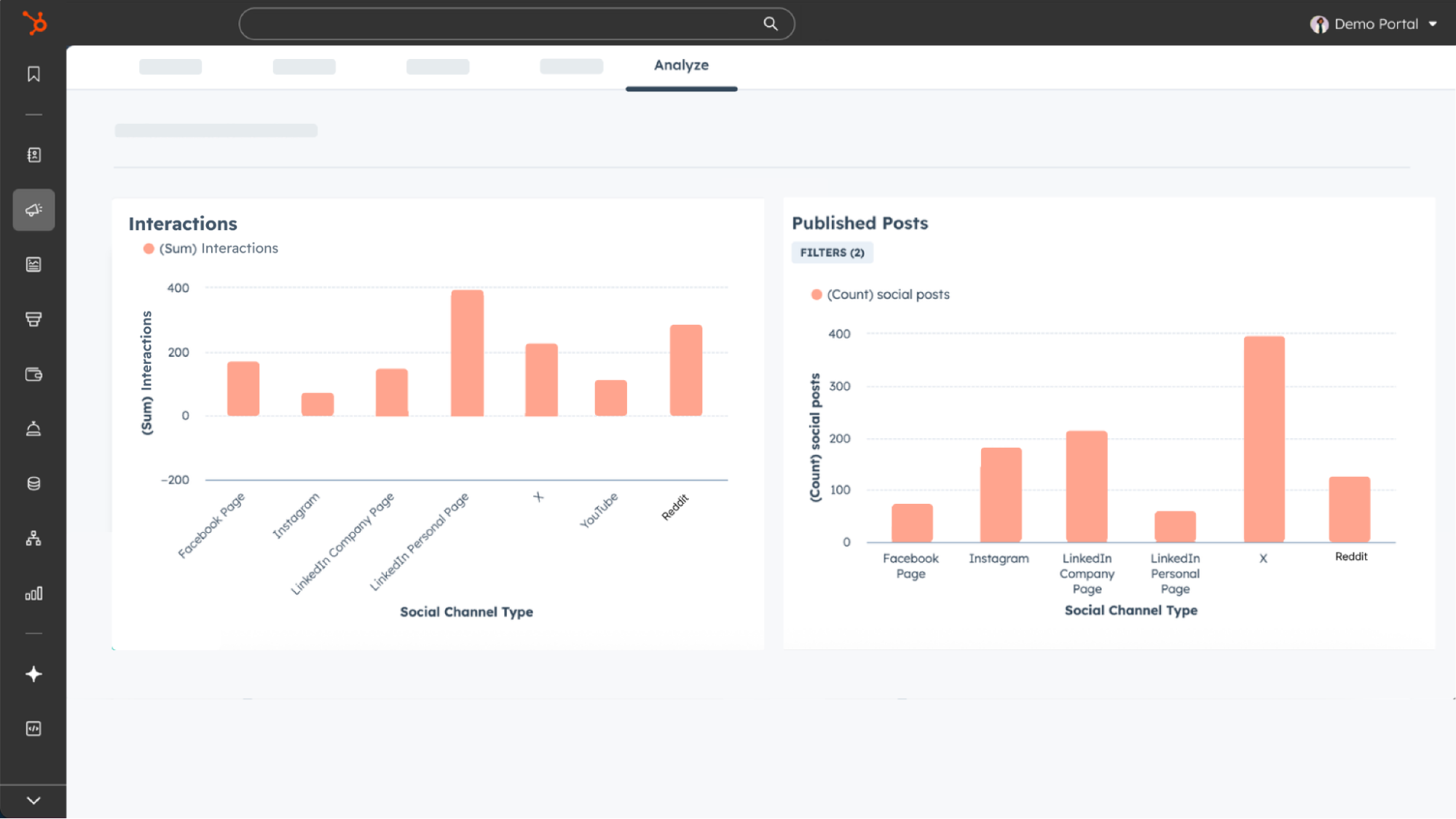
- Monitor analytics: Track post performance directly in HubSpot, including comments and scores (upvotes/downvotes) on your Reddit posts.
Why does it matter?
Publish to Reddit where you publish everything else. Before marketing teams had to post to Reddit outside of their HubSpot marketing workflow. Now you can stop managing Reddit in a separate tab. Create and schedule posts to subreddits directly from HubSpot's social tool, alongside LinkedIn, TikTok, Instagram, and more.
Track Reddit performance next to every other channel. Before marketers needed to manually create organic performance reports in order to incorporate Reddit metrics. Now teams can quickly create custom dashboards or export reports, allowing them to make faster content decisions.
How does it work?
To connect your Reddit account to HubSpot:
- Navigate to Social Settings.
- Click Connect accounts in the top-right corner.
- Select the Reddit icon.
- Enter your Reddit credentials then select Login.
- An authorization window will open. Choose Allow.
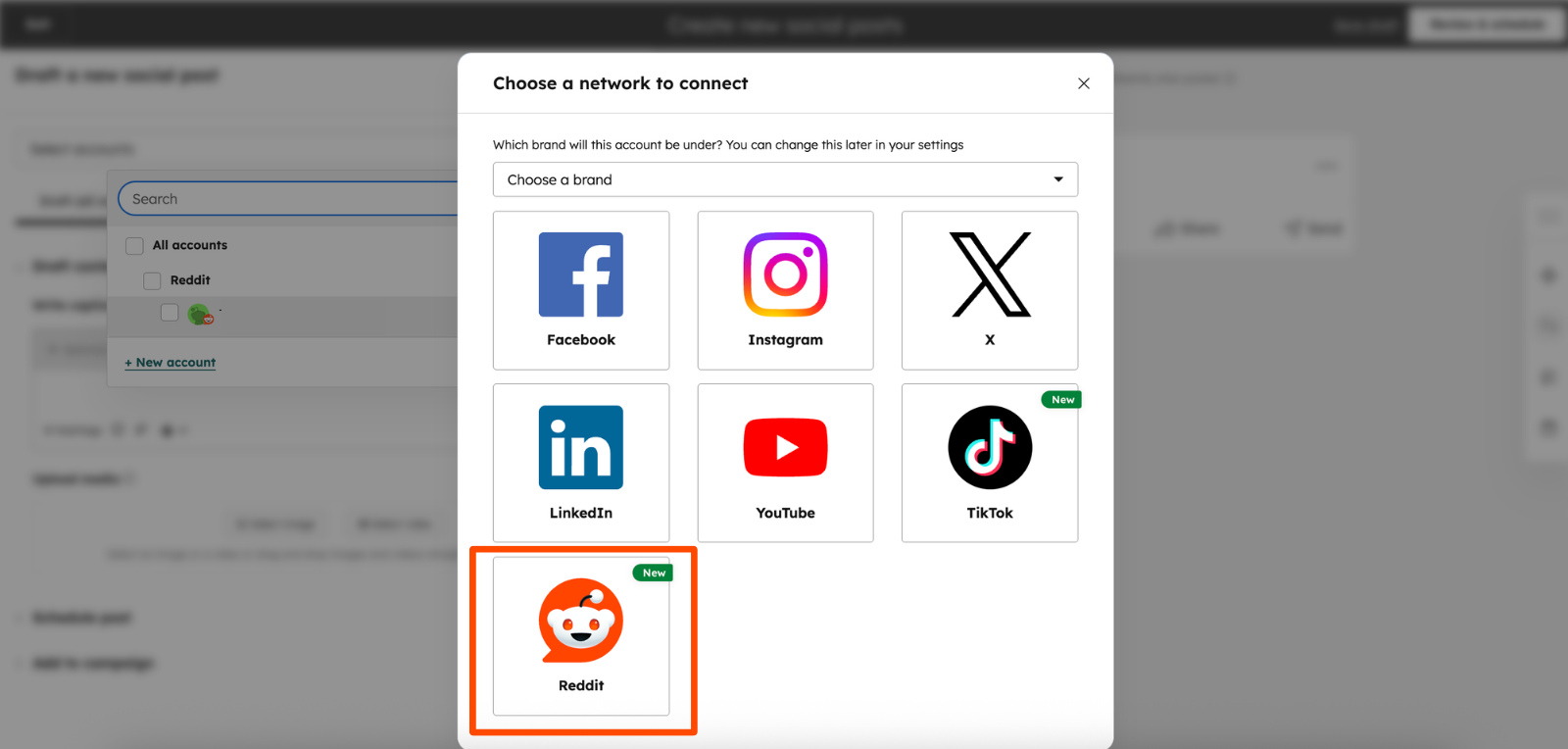
To publish a Reddit post in HubSpot:
- In the HubSpot side bar navigate to Marketing → Social.
- At the top right click, Create social post.
- Click Select accounts to find the Reddit account you’d like to post on.
- Click the Reddit icon to customize your post for Reddit.
- Select Search for a subreddit
- Write the title and body text for your post
- Select the date and time for your post to go live.
- Click Review and schedule at the top right.

To reply to comments and mentions of your brand:
- In the HubSpot side bar navigate to Marketing → Social.
- Click on the Reply tab.
- Select the comment or the mention you’d like to reply to.
- Type your response in the dialogue box then click Reply.
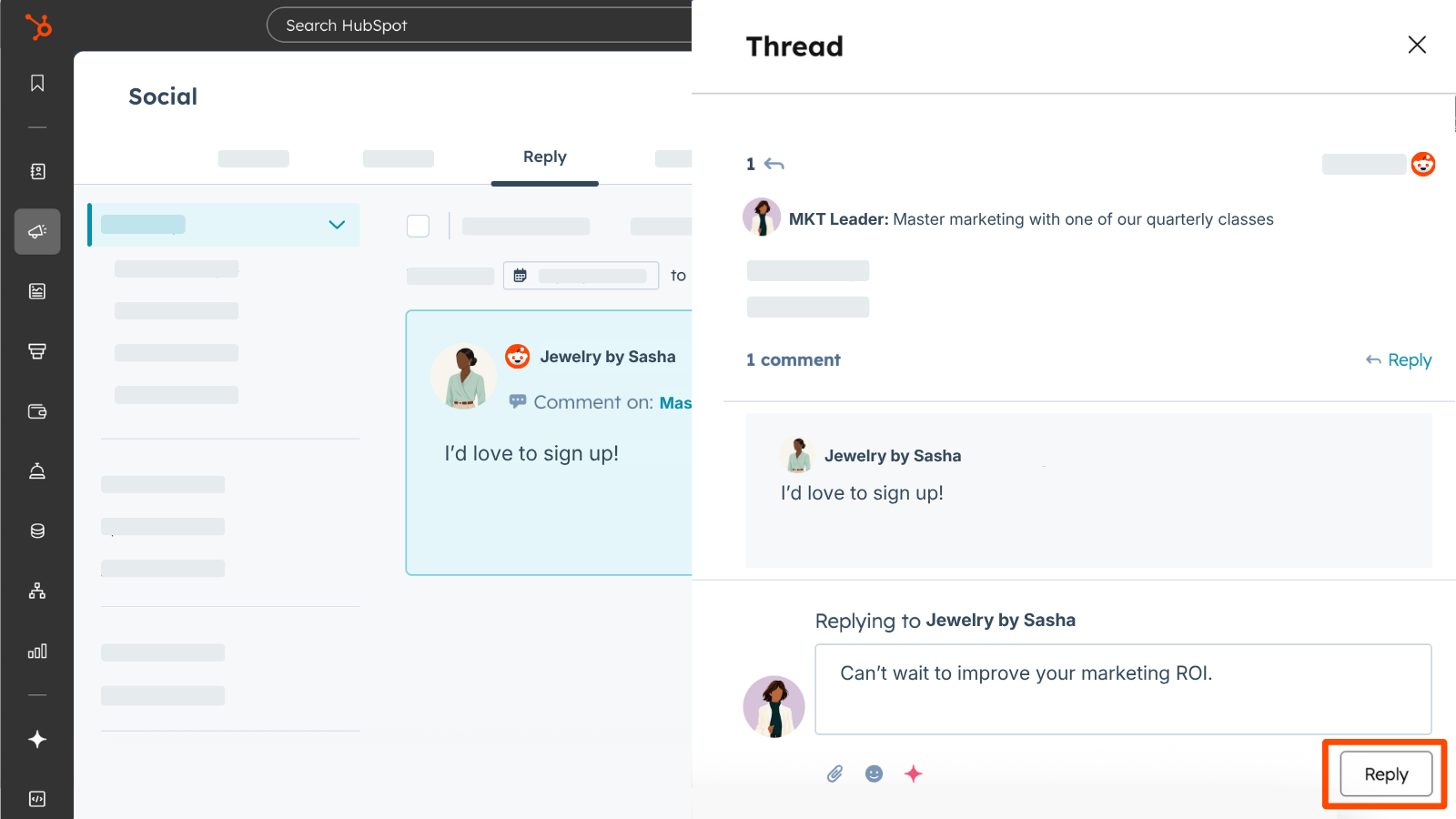
To see performance data for Reddit overall:
- In the HubSpot side bar navigate to Marketing → Social.
- Click on the Analyze tab to view reports like Interactions, Published Posts, and more.
To see performance data for a specific post:
- In the HubSpot side bar navigate to Marketing → Social.
- In the Manage tab, hover over a specific post and click Details to see the post score (upvotes minus downvotes) and number of comments.
Prospecting Agent Gets Smarter: Buying Signals and Contact Sourcing
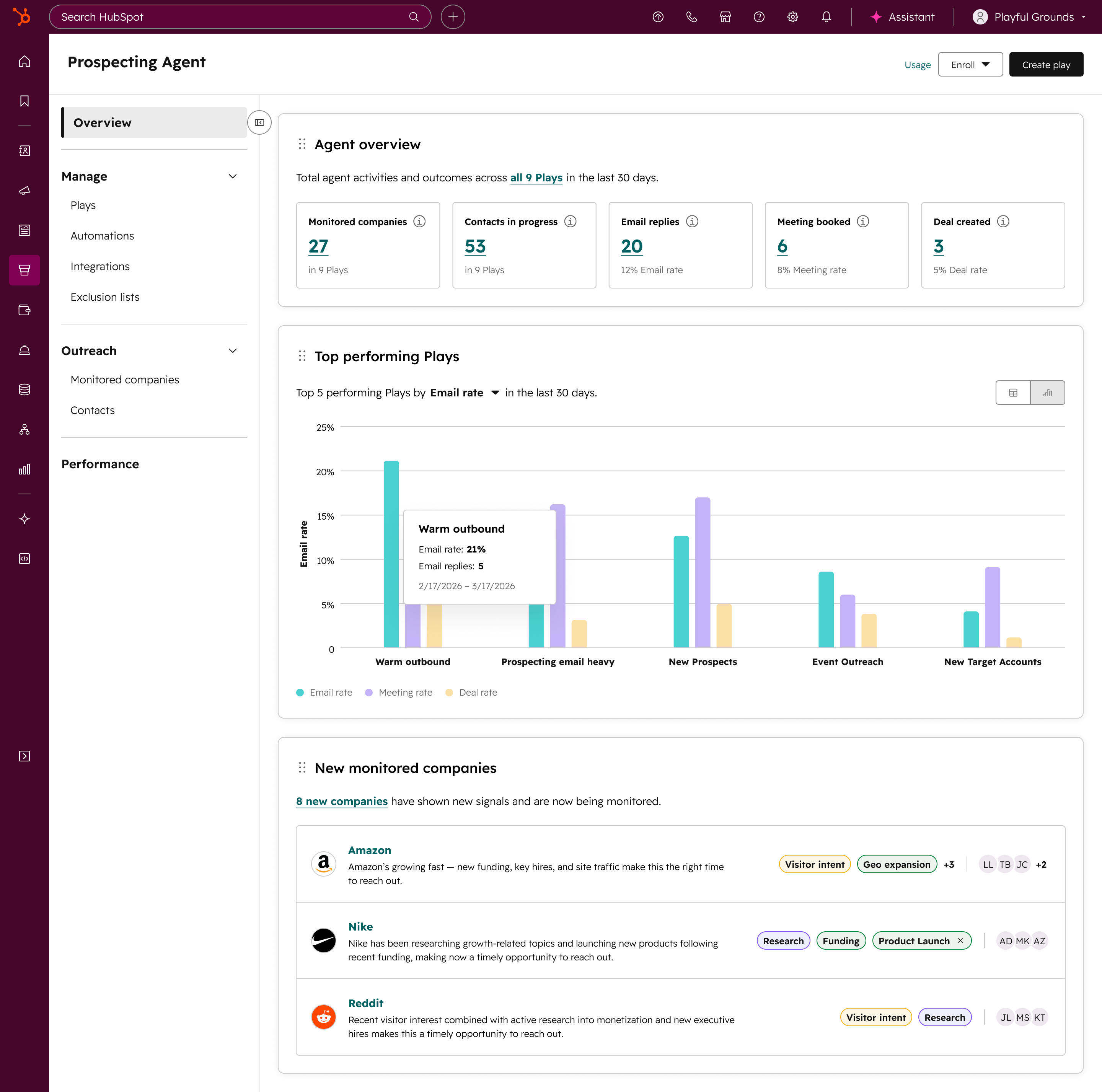
Prospecting Agent has evolved to become an end-to-end outbound agent, enabling sales organizations to automatically identify in-market companies based on real-world triggers and instantly source the right contacts via 3rd party integrations.
With this update, Prospecting Agent can:
- Detect companies that match key buying signals (like growth, hiring, funding, or intent)
- Automatically identify and source relevant contacts at those companies from within the CRM or through 3rd party integrations
- Generate and enroll contacts in personalized email outreach and calling tasks
Why does it matter?
Sales reps currently spend significant time manually building account lists, finding contacts, and researching companies before they even begin outreach. This manual process lacks intent and often leads to engagement with prospects when the timing isn’t right or produces generic outreach that doesn't resonate.
Prospecting Agent addresses this by automatically identifying companies showing buying signals, sourcing contacts, and generating personalized outreach, so reps can engage buyers at the right time without any manual research.
How does it work?
Admins create Plays, which define how the Agent researches, sources, and engages:
- Prospecting Agent monitors selected companies for signals (e.g. growth, hiring, funding, intent)
- A triggered signal prompts the agent to identify relevant companies
- The agent recommends contacts sourced from third-party providers
- The agent drafts multichannel outreach for the sourced contact
- The rep approves to the contact or outreach is automatically approved
It all runs continuously in the background, no manual list building, no refreshing. Just the agent working toward your predefined goal, like a booked meeting.
Limitations:
- Supported signals are limited to a predefined set and may not cover all buying indicators
- Prospecting Agent may not find contacts for every triggered company
- Contact sourcing requires a connected third-party provider (see below)
- Coverage and data quality vary by provider and your contract with them
Third-party contact sourcing:
The Prospecting Agent integrates with 3rd party sales intelligence providers to help source contact data. To source contacts, you must connect via Oauth at least one supported provider inside the Prospecting Agent app:
- ZoomInfo
- Apollo
- Surfe (API key support only)
Prospecting Agent does not include contact data by default. All enrichment, usage limits, and compliance are governed by your existing agreement with each provider.
Pricing & 28-Day Free Access
The Prospecting Agent consumes HubSpot credits. For more information on pricing, please visit our pricing page.
Eligible customers will receive 28-day free access to the Prospecting Agent that starts after activating the Agent for the first time, allowing you to test signal-powered prospecting in real-world scenarios without using credits.
Free access is only available in this version of the Prospecting Agent, which features signal-powered prospecting and contact sourcing.
After 28-day free access ends:
- Your Prospecting Agent will automatically pause
- You decide when to start using paid credits. You can turn Prospecting Agent back on anytime in Usage & Limits and manage them inside the Prospecting Agent app. Prospecting Agent will use credits at that time.
Generate LinkedIn Articles from AEO Recommendations
You can now generate AI-drafted LinkedIn articles directly from AEO recommendations, making it faster to act on gaps in your brand's AI search visibility.
HubSpot's AEO (Answer Engine Optimization) tool tracks how AI answer engines like ChatGPT, Gemini, and Perplexity respond to questions relevant to your brand. When LinkedIn articles are being cited in those responses and your brand isn't mentioned, AEO recommends LinkedIn article topics to help improve your visibility. Now you can act on those recommendations by generating an AI-drafted LinkedIn article directly within the AEO tool.
Why does it matter?
Buyers are increasingly asking AI engines for product recommendations and industry advice instead of searching the web. When those engines respond, they cite sources, and LinkedIn articles (long-form content published directly on LinkedIn) are among the most commonly cited. If a competitor's article is showing up in those answers and your brand isn't, prospects are forming opinions before they ever visit your website.
AEO already flags these gaps and recommends what to publish. But going from recommendation to published article is a heavy lift: you'd need to research the topic, structure the piece, and write something that reads as genuine thought leadership, not marketing copy.
Now, from any LinkedIn article recommendation in AEO, you can generate a full article draft. Review the recommendation details and data sources, then click Generate article to get a draft that reflects your brand voice. The generated title and body each have their own copy button so you can paste them into LinkedIn's article editor, review and edit the draft, and publish when it's ready. An optional companion post is also generated so you can announce the article on your LinkedIn feed, since articles don't automatically appear in your connections' feeds.
How does it work?
- In your HubSpot account, navigate to Marketing > AEO.
- Open a LinkedIn article recommendation and click Create LinkedIn article.
- Review the article title, summary, and data sources.
- Click Generate article. If you have Brand Voice set up, the draft will reflect it.
- Once generation is complete, the article appears in the Content tab of the recommendation panel. The title and body each have their own copy button. An optional companion post is also included so you can announce the article on your LinkedIn feed.
- Copy the content and paste it into LinkedIn's article editor. Review and edit the draft, then publish. A link to How to publish a LinkedIn article is included.
AEO: Track and Improve your Brand Visibility in AI-powered Search
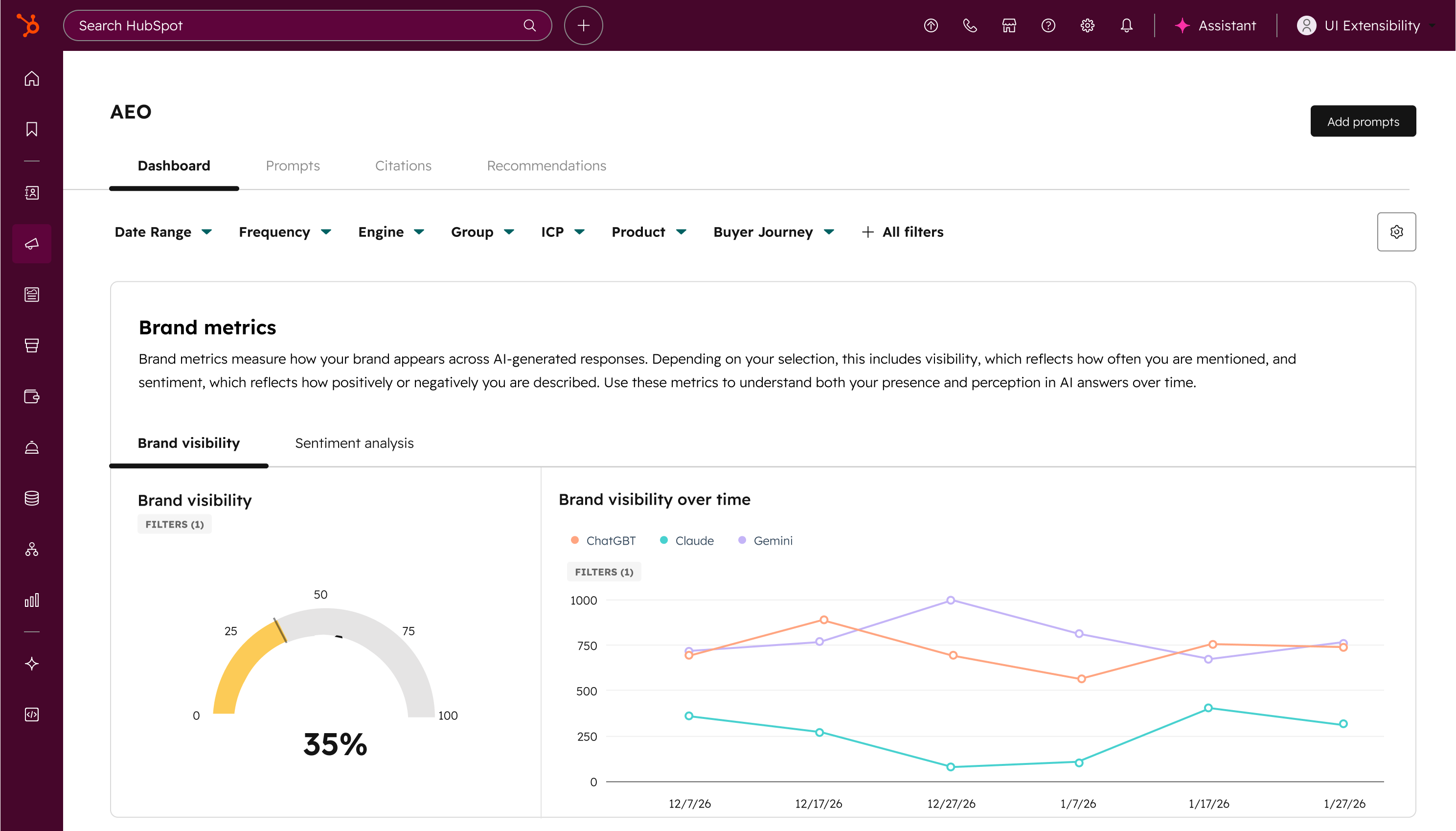
AEO (Answer Engine Optimization) is now available in Marketing Hub. Measure, track, and improve your brand's visibility across ChatGPT, Perplexity, and Gemini, and go from insight to published content without leaving HubSpot.
Why does it matter?
How people discover brands is changing.
Instead of clicking through traditional search results, buyers are increasingly asking questions directly in answer engines. These AI responses often summarize the market, recommend vendors, and cite sources before a customer ever visits a website.
Because AI pulls from consensus across third-party sources, buyers tend to trust these recommendations more than traditional search results. This means leads coming from AI search arrive better informed and further along in their decision.
The challenge: SEO is no longer enough. You need to start showing up in AI recommendations.
Most AEO tools hand you a visibility report and wish you luck. AEO in Marketing Hub is different. It shows you exactly where the gaps are, connects recommendations directly to the content tools you already use, and gets smarter over time because it's drawing from your CRM data. Other AEO tools don't know your business. HubSpot already does.
How does it work?
Set up prompt tracking
In your HubSpot account, navigate to Marketing > AEO.
(Note: It may take up to 10 minutes to appear in your menu. In the meantime, you can search "AEO" in the top navigation bar to get started.)
During onboarding, you'll confirm basic information about your business. Because AEO is connected to your CRM from day one, HubSpot automatically suggests prompts based on your industries, competitors, and customer segments — not generic industry questions. You can also add your own custom prompts. HubSpot runs these prompts daily against leading answer engines and tracks how your brand appears.
Review your visibility data
Once your prompts are running, you can view:
- Brand visibility percentage showing how often your brand appears in AI responses
- Competitor comparison showing where competitors appear when your brand doesn't
- Visibility trends over time
- Performance differences across answer engines
Analyze individual prompts
Click into any prompt to see:
- The exact AI responses returned
- Which sources (domains, content types) are being cited
- Whether competitors are being referenced and why
Get recommendations and act on them
Based on your prompt data, AEO surfaces tailored recommendations for what content to create or optimize, along with the reasoning behind each suggestion and which prompts it would impact. And because AEO lives inside Marketing Hub, you can act on those recommendations right away using the content and social tools you already use. No spreadsheet handoffs, no switching platforms.
Opt In/Out Setting for HubSpot AI Model Training
Customers can now control whether their account data is used for HubSpot AI model training through an in-app admin toggle.

Why does it matter?
Reason for development
Until now, opting out of AI model training required a manual, email-based process that was slow, opaque, and easy to miss. The new in-app toggle gives customers instant, self-serve control over how their data is used
How does it work?
Functionality
Super Admins can access AI model training settings on the AI Settings page and use a toggle to opt in or out of having account data used for AI model training. Accounts with sensitive data enabled are automatically opted out and cannot opt in.
Don't Miss How AI is Shaping Your Brand
With so many of this week’s updates centered around AI, from prospecting to content creation to search visibility, it’s clear that understanding how your brand shows up in AI is no longer optional.
If you missed our recent session, you can still catch up and see exactly how AI engines are interpreting brands, surfacing content, and influencing buyer decisions.
Watch the recording of What AI Knows About Your Brand and see real examples and early results in action.