 Monica Cavanagh
As of today, June 16, HubSpot officially rebranded Commerce Hub as Revenue Hub. But this isn't a cosmetic change. HubSpot is making a bold move into one of the messiest parts of your business: everything that happens after a deal gets real.
We're talking about quoting, contracting, billing, payment collection, renewals, and revenue reporting, all connected inside HubSpot. Read on for the details:
Where Revenue Processes Usually Get Messy
Here's a scenario most teams know too well:
- A quote gets built in one tool
- Contract details get copied somewhere else
- Invoices are generated in yet another system
- Payment data has to be reconciled later
- And then sales, RevOps, finance, and customer success all try to piece together what happened
It works until it doesn't. And when it breaks, it's painful.
HubSpot is making a simple point with Revenue Hub: your revenue data is too important to be scattered across spreadsheets and disconnected tools. If your teams and your AI tools are expected to act on customer context, they need to see the full revenue picture too.
What Revenue Hub Is Built On
Revenue Hub brings three core functions together:
- CPQ (Configure, Price, Quote): Sales reps build accurate quotes with the right products, pricing, approvals, and terms without ever leaving HubSpot.
- Billing: Once a quote is accepted, invoices are generated, subscriptions are managed, and recurring charges are handled automatically.
- Payments: Eligible customers can collect payment through HubSpot payments (available in the U.S., U.K., and Canada) or Stripe payment processing in HubSpot for businesses outside those regions. Teams moving from other external payment processors should expect some additional discovery before assuming existing methods, subscriptions, or card data can migrate cleanly.
Tying it all together is the contracts object, a single source of truth for what was sold, what's been billed, what's been paid, and what's coming up for renewal. When a customer expands, downgrades, or changes their billing schedule, those updates flow back into the contract without forcing your team to rebuild everything manually.
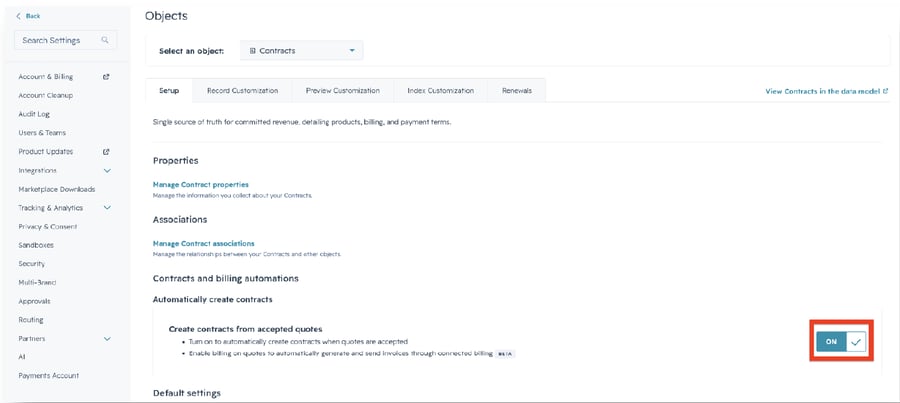
If you've been managing recurring revenue in HubSpot through custom deal automations and reporting workarounds, this is the change you've been waiting for.
The Product Updates Worth Paying Attention To
Revenue Hub isn't a repackage. HubSpot shipped real functionality:
- Price Books Different pricing for different customers, automatically. Segment by region, industry, or any condition you define. The right price book gets applied without your reps having to think about it.
- Quote Rules Keep reps from going off-script. Quote rules can warn or block a rep when a quote breaks the rules: wrong product bundle, missing required onboarding, discounts that go too deep. Less rogue quoting, fewer awkward conversations later.
- Workflow-Based Approvals Quote approvals now run on HubSpot workflows, which means they can be routed based on real CRM data. More flexibility, less workaround.
- A No-Code Quote Builder (Plus Custom Coded Modules) Admins get full control over layout, branding, sections, and terms. And for more advanced use cases, custom coded quote modules can turn a quote into an interactive buyer experience: think embedded calculators, meeting links, dynamic terms, and industry-specific content.
This is one of the more interesting roll outs of the announcement: HubSpot is no longer treating a quote like a static PDF. It's a tool to move deals forward and create a better buying experience.
AI Is Built Into the Revenue Workflow
HubSpot's Breeze Assistant is being enabled across revenue workflows, creating quotes, editing them, generating invoices, and surfacing invoice information on demand.
Inside the Customer Agent, reps can show invoices, collect payment, and send payment links directly from a conversation. And a Revenue Agent for collections is coming in private beta, designed to automatically follow up on outstanding invoices.
The bigger picture: HubSpot is building toward a future where AI handles the administrative work across the full customer journey. But that only works if the underlying data is clean, connected, and accessible, which is exactly what Revenue Hub is designed to power.
So What Does This Mean for Your Business?
Revenue Hub isn't a "flip the switch" situation. Before diving in, it's worth asking:
- Is your product library clean enough to support structured quoting?
- Should billing live in HubSpot, your ERP, or both?
- Are you eligible for HubSpot payments, or does Stripe make more sense for your setup?
- What happens in HubSpot when a customer renews, expands, or changes their contract?
These aren't small questions, and the teams that get the most out of Revenue Hub will be the ones that configure it thoughtfully from the start.
As a HubSpot Diamond Partner, we can walk through what this announcement means for your specific portal, your revenue process, and your team. Whether you need a quick read on where to start or a full phased implementation plan, we'll help you figure out what's worth acting on now and what to watch as the product matures. Talk to us about Revenue Hub
