 Orange Marketing
If your company uses Marketing Contacts in HubSpot, there is a new setting we recommend checking ASAP.
HubSpot has introduced Maximum Marketing Contact Limits, giving customers a way to cap the number of contacts that can be designated as marketing contacts. This is important because exceeding your Marketing Contacts tier can result in an automatic upgrade to a higher contact tier and an unexpected increase in your bill.
There is just one catch: HubSpot does not automatically set the maximum for you. You need to go into your portal and set it yourself.
What Changed With Marketing Contacts?
Until now, there wasn't a built-in way to establish a hard ceiling on the number of contacts that could become marketing contacts. That meant an import, workflow, or another automated process could potentially increase your marketing contact count beyond your current tier. By the time someone noticed, the portal could already be over its limit.
The new Maximum Marketing Contacts setting gives you another guardrail. Once you establish a maximum, HubSpot will prevent manual imports and automated processes from pushing the number of marketing contacts beyond that number. Contacts that would put you over the maximum will instead be set as non-marketing.
For companies with large databases, frequent imports, or multiple people and processes managing contacts, that's a valuable safeguard.
What You Should Do Now
If you use Marketing Contacts, we recommend setting your maximum now rather than waiting until you are approaching your limit.
Go to: Settings → Account & Billing → Marketing Contacts → Maximum Marketing Contacts
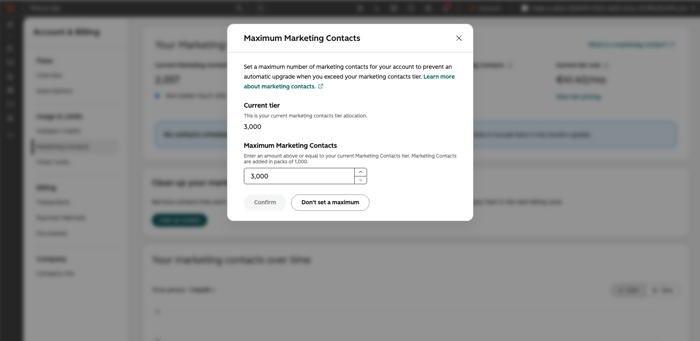
From there, enter the maximum number of contacts you want to allow to be designated as marketing contacts.
If the portal reaches that number, HubSpot will display an in-app message indicating that the maximum has been reached. Super Admins, workflow owners, and users with Modify Billing permission may also receive email notifications.
One Important Catch for HubSpot Customers Working With a Partner
There's another detail Rebecca Gonzalez, Orange Marketing's Founder and CEO, called out when she shared the update on LinkedIn.
Your HubSpot Partner Admin cannot set this limit for you.
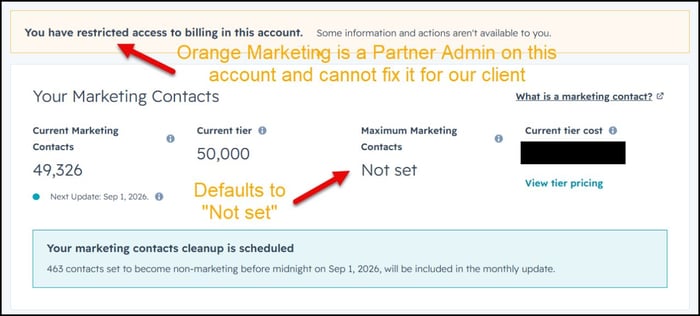
The setting is available to Super Admins and users with the appropriate billing permissions. So even if a HubSpot partner helps manage your portal, someone within your organization with the necessary access may need to make this change.
Check now, particularly if you typically rely on your partner or outside HubSpot administrator to manage settings on your behalf.
A Small Setting That Could Prevent a Much Bigger Headache
This isn't one of HubSpot's flashier releases. There's no new AI agent or major interface overhaul. But it may be one of the more important settings HubSpot customers can configure right now.
Marketing databases grow in plenty of ways, and not all of them involve someone deliberately deciding to add thousands of marketing contacts. Imports, workflows, integrations, and other processes can all affect who gets designated as a marketing contact. A maximum gives you a way to put a boundary around that growth before it turns into a billing surprise.
While You're Checking Your Marketing Contacts, Take a Look at Your Email Health Too
A clean, well-managed contact database matters for more than your HubSpot bill. Who you're emailing, how often you're sending, and the quality of your list can all affect whether your messages reach the inbox.
On August 27, Orange Marketing CEO Rebecca Gonzalez is sitting down with ZeroBounce Director of Email Deliverability Luke Glasner for Inbox Denied: What's Really Blocking Your B2B Email and How to Fix It, a live Q&A covering how to spot deliverability problems, repair sender reputation, and keep those problems from coming back.
